Contributed works of Andrés González López
Anchor Windows (ON MOUSEDRAG)
Bos Taurus – Incredible !!!
DEFINE REPORT (with filtered data)
Demo Debug
Generate PDF files
Improved interfaces (Label Button)
My color list (i_color.ch)
Anchor Windows (ON MOUSEDRAG)
Bos Taurus – Incredible !!!
DEFINE REPORT (with filtered data)
Demo Debug
Generate PDF files
Improved interfaces (Label Button)
My color list (i_color.ch)
This is a standard for establishing and maintaining NANFOR.LIB, a public-domain, user-supported library of functions designed to interface with Computer Associates CA-Clipper, version 5.01a, and later. You are encouraged to read it over and forward comments to Glenn Scott, CIS ID [71620,1521].
In October and November of 1990, a discussion on the evolution of third-party products, vendors, and marketing took place on the CompuServe Information Service’s Nantucket Forum (NANFORUM). During this discussion, a forum subscriber named Alexander Santic suggested the idea of a user-supported Clipper function library, available to all on the CompuServe Information Service (CIS). A number of subscribers, including several Clipper third party developers, and some Nantucket employees, expressed their support. This standard was a first step toward organizing such an endeavor.
Release 1.0 of the toolkit was made available in April, 1991 and had nearly 150 functions. By the time version 2.0 was released in August, 1991, the 1.0 library had been downloaded nearly 700 times by CompuServe users. By October of 1992, release 2.0 had been downloaded over 2100 times. The source code had been downloaded nearly 1500 times. In addition, release 2.0 was placed on the massive Internet archive site called SIMTEL20 where it was downloaded by CA- Clipper users worldwide. Over the course of the year that release 2.0 was available, seven patches were issued, each one gathering nearly 1000 downloads.
Computer Associates International, Inc. acquired Nantucket in the summer of 1992 and subsequently renamed NANFORUM to simply CLIPPER. In addition, the Clipper product itself was renamed to CA-CLIPPER. Despite the name changes, forum members decided to keep the toolkit’s name as “The Nanforum Toolkit,” partly for nostalgia. References to NANFORUM in this RFC have been replaced with CLIPPER.
CA-Clipper is a registered trademark of Computer Associates International, Inc. Computer Associates will be referred to as CA throughout this document.
NANFOR.LIB is a project independent of any third party developer or CA. There is no official “sanction” or “seal of approval” from CA of any kind. In addition, NANFOR.LIB routines will be accepted and included without regard for whether or not routines performing a similar function are included in a commercial third party or CA product.
It is desired that NANFOR.LIB not compete with third party products but rather fill in the holes in CA-Clipper’s standard library. However, there will be some overlap into commercial third-party library functions, so it would be best if this is never taken into consideration when deciding on including a particular function.
Developers submitting NANFOR.LIB routines can and will be corporate developers, third party developers, independent consultant / programmers, hobbyists, and other CA-Clipper people. Perhaps even CA employees will contribute. No one is excluded or included due to any particular affiliation.
CA employees submitting functions are doing so as individuals, and are not making a policy of involving CA in the project, nor are they committing CA to supporting the public domain library.
NANFOR.LIB functions, no matter what language they are written in, will be designed to work with CA-Clipper version 5.01a and later. Many of the functions, particularly those that use the EXTEND system, will be compatible with the Summer 1987 version of CA-Clipper. However, ensuring Summer 87 compatibility will be the responsibility of the user. If a user wants a function to work with Summer 87, she will have to modify the code herself if necessary. In many cases, this is a trivial task.
Queries from new users interested in finding NANFOR.LIB should be handled in a uniform and courteous way. A short text file will be created that will briefly explain NANFOR.LIB, who the current people maintaining it are, and how to get a hold of it. This text message can be sent in response to any query. TAPCIS users will find this method very easy to implement.
NANFOR.LIB, its source code, and documentation will be public-domain software. It is not for “sale”, and shall not be sold. No fee or contribution of any kind will be required for anyone wanting a copy, other than what they would normally pay to download it from CompuServe. Users will be encouraged to submit functions via CompuServe.
It is possible that copies of NANFOR.LIB will be downloaded and distributed elsewhere. This is encouraged, but the only copy of NANFOR.LIB and all associated documentation that will be maintained by volunteers is in an appropriate library on the CIS CLIPPER Forum.
The deliverables that make up the official posting on CompuServe shall be:
2.2.1.1 NFLIB.ZIP
This will contain the files NANFOR.LIB (library), and NANFOR.NG (Norton Guide).
2.2.1.2 NFSRC.ZIP
This will contain all the library source code, makefile, and other source-code related materials.
2.2.1.3 NFINQ.TXT
This is a short text file used as a response to new user queries (see paragraph 1.5)
2.2.1.4 NFRFC.ZIP
This contains an ASCII format, as well as a WordPerfect 5.1 format copy of NANFOR.RFC named NFRFC.TXT (ASCII) and NFRFC.WP5 (WordPerfect 5.1).
2.2.1.5 NFHDRS.ZIP
This contains templates of the file and documentation header blocks, including a sample, for prospective authors (FTHDR.PRG, FTHDR.ASM, FTHDR.SAM)
2.2.1.6 PATx.ZIP
These are patch files (see paragraph 4.5.1).
It is possible that more than one developer will submit a function or package of functions that perform substantially the same services. In that event, the referees will choose one to be included based on power, functionality, flexibility, and ease of use. Due to the cooperative, non-commercial nature of the library, no one’s feelings should be hurt by excluding duplicate functions.
In addition, it is possible that two substantially similar functions or packages will benefit from merging them together to provide new functionality. This will be the prerogative of the referees (see paragraph 6.3), in close consultation with the authors.
Each author submitting source code must include as part of that code a statement that this is an original work and that he or she is placing the code into the public domain. The librarian (see paragraph 6.1) and referees should make a reasonable effort to be sure no copyrighted source code, such as that supplied with some third party libraries, makes it into NANFOR.LIB. However, under no circumstances will the librarian, referees, or any other party other than the submitter be responsible for copyrighted code making it into the library accidentally.
Full source code must be provided by the author for every routine to be included in NANFOR.LIB. No routine, no matter what language, will be put into the library on the basis of submitted object code.
Due to the volume of submissions expected, librarians and referees may not have the time to fix inconsistencies in documentation format, function naming, and other requirements. Therefore, the librarian shall expect source code to arrive in proper format before proceeding further with it.
In a cooperative effort like this, it is very difficult to enforce some standard of quality and/or usefulness. For example, a package of functions to handle the military’s “Zulu time” may be very useful to some, and unnecessary to others.
The Nanforum Toolkit will by its very nature be a hodgepodge of routines, some of very high quality, some not so high. It is up to the users to improve it. It will be complete in some areas and vastly inadequate in others. It is up to the users to fill in the holes.
We shall err on the side of including “questionable” functions, provided they seem to work. Debates on the quality of the library’s source code shall be encouraged and will take place in the proper message section of the CompuServe CLIPPER forum.
Source code will be submitted to the librarian, the documenter (see paragraph 6.2), or one of the referees. Code will be added if it has been reviewed, and approved by at least one, but preferably two, referees.
Code not meeting the documentation or source code formatting standards will generally be returned to the author with instructions.
Referees will test the submitted code. When the referees have finished evaluating a submission, they will report their approval or disapproval to the librarian, with comments.
Every effort should be made to make sure that the C and ASM functions are reviewed by referees with suitable C and ASM experience.
As new functions are submitted, they will added to the library, and the documentation updated. Because this is a volunteer project, and because of the complexity involved in coordinating testing, documentation, and delivery, there will be no fixed interval for updates.
NANFOR.LIB will use a numeric version number as follows:
The major version will be numeric, starting from 1. This will change with each quarterly update. The minor version will change with each bug fix. This will start with zero and continue until the next major update, at which point it will revert to zero again.
Typical version numbers might be 1.1, 2.12, 15.2, etc.
The .LIB file, and all associated files, will carry a date stamp corresponding to the day it is released on the CLIPPER forum. The file time stamps shall correspond to the version number (i.e., 1:03am is version 1.3).
As the library and its associated documentation are updated, simple announcements will be posted on the CLIPPER forum. This is the only place where an update shall be announced. An update will be announced after it has been successfully uploaded to the appropriate library on CompuServe.
The librarian will correlate and verify all bug reports, with the help of the referees. If the referees believe a bug to be serious, they will fix it and the librarian will release a maintenance upgrade immediately. If they consider it a minor bug, they will fix it but wait for the next scheduled upgrade to release it. In this case, a bug fix may be released as a “Patch.”
A “patch” is simply an ASCII text file containing instructions for editing the source code to a misbehaving function or group of functions. Patches may appear in the CIS library before a maintenance release or quarterly upgrade. A patch file will have a name of the form
PATn.ZIP
where <n> is a number starting from 1. Patches will be numbered sequentially. Patches will be deleted every time a new version of NANFOR.LIB goes on-line.
A patch zipfile may optionally contain .OBJ files to be replaced in user libraries via a LIB utility.
Technical support will work just as any technical subject on the CompuServe CLIPPER forum works. Users will post questions and suggestions to a particular message area or thread, and anyone who knows the answer should respond. No one is obliged to answer, but it is considered good form to respond with something, even if one doesn’t know the answer.
Support will include help on recompiling the routines or modifying the source.
In order to assist users of CA-Clipper third party linkers (such as WarpLink or Blinker), NANFOR.LIB may need to broken up into root and overlay sections. How this will be done will be determined when splitting becomes necessary.
The librarian is not responsible for testing every possible linker for NANFOR.LIB compatibility. It is hoped that linker users will submit appropriate link scripts or other documentation for posting in the appropriate section on the CLIPPER forum.
It is possible that at some future date, it will make sense to split NANFOR.LIB into separate functional areas (e.g., video routines vs. date routines, etc). This RFC will be modified accordingly should that need arise.
The goal of this standard is not to force anyone to rewrite his code for this library, but to create some consistency among the functions so that they may more easily maintained and understood by all CA-Clipper developers, both novice and advanced.
However, it is extremely important that anyone submitting code attach the proper headers and documentation and fill them out correctly. This will make it much easier for code to be added to the library.
Figure 1 shows a header that must be included at the top of every piece of source code submitted to the library. This header will work with both CA-Clipper and C code. For ASM code, substitute each asterisk (“*”) with a semicolon (“;”) and delete the slashes (“/”).
/*
 * File......:
 * Author....:
 * CIS ID....: x, x
 * Date......: $Date$
 * Revision..: $Revision$
 * Log file..: $Logfile$
 *
 *
 * Modification history:
 * ---------------------
 *
 * $Log$
 *
 */
Figure 1 - Standard function header.
Note that the date, revision, logfile, and modification history fields will be maintained by the librarian and should not be edited or adjusted by code authors.
The “File” field shall contain the source file name. This is often independent of the individual function name. For example, a function named ft_screen() would be included in SCREEN.PRG. As a rule, source files (.PRG, .C, .ASM) should not have the “FT” prefix.
The “Author” field should have the author’s full name, and CIS number. A CIS number is important, as this will make bug fixing and other correspondence easier.
Authors shall simply state “This is an original work by [Author’s name] and is hereby placed in the public domain.”
/* $DOC$
 * $FUNCNAME$
 *
 * $ONELINER$
 *
 * $SYNTAX$
 *
 * $ARGUMENTS$
 *
 * $RETURNS$
 *
 * $DESCRIPTION$
 *
 * $EXAMPLES$
 *
 * $SEEALSO$
 *
 * $INCLUDE$
 *
 * $END$
 */
Figure 2 – Standard Documentation Header
The documentation block must be carefully formatted as it is used by the documenter to produce the Norton Guide documentation for the library.
The keywords enclosed in dollar-signs delimit sections of the documentation header analogous to those in the CA-Clipper 5.0 documentation. Documentation should be written in the same style and flavor as the CA material, if possible. Refer to the CA-Clipper documentation for more detail and numerous examples.
The documentation will appear on comment lines between the keywords. Examples are optional. Do not put documentation on the same line as the comment keyword.
Note that the $DOC$ and $END$ keywords serve as delimiters. Do not place any text between $DOC$ and $FUNCNAME$, or any documentation after the $END$ keyword, unless that documentation belongs in the source code file and not in the resultant Norton Guide file.
The $FUNCNAME$ keyword should be followed by the function name, with parentheses, and no arguments or syntax, such as:
$FUNCNAME$
   ft_screen()
Note the indent for readability. Parentheses shall be added after the function name as shown above.
The $ONELINER$ keyword should be followed by a simple statement expressing what the function does, phrased in the form of a command, e.g.:
$ONELINER$
Sum the values in an array
The length of the entire $ONELINER$ shall not exceed 60 characters (this is a Norton Guide limitation).
The $SYNTAX$ keyword should be followed by a CA- standard syntax specifier, such as:
$SYNTAX$
ft_screen( <nTop> [,<nBottom>] ) -> NIL
All parameters have proper prefixes (see paragraph 5.4), and are enclosed in <angle brackets>. Optional parameters are enclosed in [square brackets] as well. An arrow should follow, pointing to the return value. If there is no return value, it should be NIL. Any others should be preceded with the proper prefix (see the CA- Clipper documentation).
The $SEEALSO$ field provides a way to generate cross-references in the Norton Guide help documentation. Use it to point the user to other related functions in the forum toolkit. For example, if ft_func1() is also related to ft_func2() and ft_func3(), the field would look like this:
$SEEALSO$
ft_func2() ft_func3()
Note that fields are separated by spaces and the parentheses are included.
The $INCLUDE$ area allows you to specify what files are included by this function (this will be used to organize the on-line help file, and possibly the master makefile). An example would be
$INCLUDE$
int86.ch int86.inc
Other documentation fields should be self- explanatory. Review the appendix for a sample. All fields are required and must be filled in. Examples should not be considered optional.
Refer to the Appendix for a sample header and documentation block.
A test driver is an optional section of C or CA- Clipper code that will only be compiled under certain circumstances. Developers are encouraged to include a short “test section” in front of their code.
The test driver shall be surrounded by the following pre-processor directives, and placed at the top of the source file:
#ifdef FT_TEST
     [test code]
 #endif
The test driver is currently optional, but authors submitting Clipper code should seriously consider adding it. It is a good way to include short demos within a piece of source code, yet pay no penalty because it is only compiled if needed. It will be invoked when a #define is created that says “#define FT_TEST.” This is a way for submitters to include short test routines with their functions and yet keep it all in one source file. This will be useful to end users.
This test driver may become required in a future version of the RFC.
The source code shall be formatted as described in paragraph 5.4.
All NANFOR.LIB functions start with one of two prefixes. If the function is to be called by user programs, then it will begin with the prefix
FT_ ("F", "T", underscore)
Note that “FT” is a mnemonic for “Forum Toolkit.” If the function is “internal” to a module, then it will be prefixed by an underscore:
_FT ( Underscore, "F", "T" )
with no trailing underscore. Examples:
FT_CURDIR() "external"
_ftAlloc() "internal"
Some functions will be submitted that either (1) bear a similar name to another function in the library, or (2) bear an inappropriate name. For example, a function called FT_PRINT that writes a character to the screen could be said to be named inappropriately, as a name like FT_PRINT implies some relationship to a printer. The librarian shall have the responsibility to rename submitted functions for clarity and uniqueness.
5.3.1 Changing a function name after it has been released
Once the library is released with a particular function included, then a function name should generally be frozen and not renamed. To do so would probably cause difficulties with users who had used the previous name and are not tracking the changes to the library.
Clipper code shall be formatted in accordance with CA’s currently defined publishing standard. Although there will surely be some debate over whether this is a good idea, in general, the goal is to provide something consistent that all CA- Clipper developers will recognize.
Minor deviations will be permitted.
The CA standard usually means uppercase keywords, and manifest constants, and lower case everything else.
In addition, identifiers shall be preceded with the proper metasymbol:
 n Numeric
 c Character or string
 a Array
 l Logical, or boolean
 d Date
 m Memo
 o Object
 b Code block
 h Handle
 x Ambiguous type
Refer to the CA-Clipper documentation for samples of CA’s code publishing format.
C source code shall be formatted in a generally accepted way, such as Kernighan and Ritchie’s style used in the book _The C Programming Language_.” The use of CA’s EXTEND.H is encouraged.
No particular formatting conventions are required for assembly language source code, since assembly code formatting is fairly standard. Lowercase code is preferred. Be sure to include the proper documentation header information, as described above.
Do not place ASM code in DGROUP. See paragraph 5.11.
Since many different people will be submitting routines, it is probably best if all routines that belong together are housed in the same .PRG. If there is some reason to split the .PRG, the referees and the librarian will handle that as part of library organization.
Including a “.ch” or “.h” or “.inc” file with each function would get unwieldy. For the purpose of NANFOR.LIB, all #defines, #ifdefs, #commands, #translates, etc that belong to a particular source file shall be included at the top of that source file. Since few submissions will split over multiple source files, there will usually be no need to #include a header in more than one place.
If a “ch” file will make the end user’s job of supplying parameters and other information to NANFOR.LIB functions easier, then it shall be submitted as a separate entity. The referees will decide on whether to include these directives in a master NANFOR.CH file.
NANFOR.LIB routines that are written in CA-Clipper will make use of CA-Clipper 5.0’s lexical scoping features to insulate themselves from the rest of the user’s application.
For example, all “privates” shall generally be declared “local.”
If a package of Clipper functions is added to the library, then the lower-level, support functions will be declared STATIC as necessary.
Authors shall not use PUBLIC variables in NANFOR.LIB functions, due to the potential interference with an end-user’s application or vice versa.
If a global is required for a particular function or package of functions, that global shall be accessed through a function call interface defined by the author (.e.g, “ft_setglobal()”, “ft_getglobal()”, and so on). Globals such as these shall be declared static in the .PRG that needs them.
The use of macros in NANFOR.LIB functions will be, for the most part, unnecessary. Since this is a CA-Clipper 5.0 library, the new 5.0 codeblock construct should be used instead. Anyone having trouble figuring out how to convert a macro to a codeblock should post suitable questions on the CLIPPER forum on CompuServe.
Any CA-Clipper 5.0 function that is only needed within the scope of one source file shall be declared STATIC. This applies mostly to NANFOR.LIB “internals” (names with an “_ft” prefix) that user programs need not access.
Use of DGROUP in assembly language functions shall be avoided, in accordance with CA’s recommendations. Assembly functions written for NANFOR.LIB shall use a segment named _NanFor, as in the following example:
Public FT_ChDir
Extrn _ftDir:Far
Segment _NanFor Word Public "CODE"
 Assume CS:_NanFor
Proc FT_ChDir Far
 .
 .
 .
 Ret
 Endp FT_ChDir
 Ends _NanFor
End
5.12 Use of "Internals"
Use of CA-Clipper “internals” by code authors is allowed. However, should any code make use of an internal, i.e., a function or variable that is not part of the published CA-Clipper API, then that internal shall be clearly marked in the documentation (under “DESCRIPTION”) and in the actual code, everywhere the internal is used.
Clipper functions will be compiled under the current release of CA-Clipper 5.0, with the following compiler options:
/n /w /l /r
Note that neither line numbers nor debugging information will find its way into NANFOR.LIB, to keep the code size down. End users may recompile NANFOR.LIB with these options enabled if they want to view NANFOR.LIB source in the debugger.
Assembly functions must compile successfully under any MSDOS assembler capable of producing the proper .OBJ file. However, care should be taken not to use any macros or special syntax particular to one vendor’s assembler, because that would make it difficult for end users to recompile the source. The preferred assembler is MASM, followed by TASM.
C functions must compile successfully under any C compiler capable of interfacing to CA-Clipper. Obviously, Microsoft C, version 5.1, is the preferred development environment. Care should be taken, when writing C code, not to use any special compiler features particular to one vendor’s C compiler, because that would make it difficult for end users to recompile the source.
It is very easy to write functions in C that call the compiler’s standard C library functions. However, NANFOR.LIB can make no assumptions about the end user’s ability to link in the standard library or any other library. Therefore, no function will be added to NANFOR.LIB that requires any other third party or compiler manufacturer’s library.
The librarian will be the person who rebuilds the library from the sources and uploads the resulting deliverables to the proper CLIPPER forum library on CompuServe. The librarian generally does *not* test code or edit source code to repair formatting errors.
The documenter is responsible for maintaining the Norton and guides and keeping it in sync with each new release.
Referees are volunteers who read source code, clean it up, compile it, look for problems like potentially problematic C code, decide on which function is best, consolidate common functions, etc. They make sure the header and documentation blocks are present. There is no election or term for refereedom. One simply performs the task as long as one can and bows out when necessary.
Not everyone will be able to stay around forever to keep working on this project. Therefore, it is the responsibility of each referee, documenter, or librarian to announce as far in advance as possible his or her intention to leave, in order to give everyone a chance to come up with a suitable replacement. Don’t let it die!
Current contributors, directly and indirectly, to this document include:
Don Caton [71067,1350]
Bill Christison [72247,3642]
Robert DiFalco [71610,1705]
Paul Ferrara [76702,556]
David Husnian [76064,1535]
Ted Means [73067,3332]
Alexander Santic [71327,2436]
Glenn Scott [71620,1521]
Keith Wire [73760,2427]
Craig Yellick [76247,541]
James Zack [75410,1567]
NOTES :
#define
 Define a manifest constant or pseudofunction
------------------------------------------------------------------------------
 Syntax

     #define <idConstant> [<resultText>]
     #define <idFunction>([<arg list>]) [<exp>]

 Arguments

     <idConstant> is the name of an identifier to define.

     <resultText> is the optional replacement text to substitute whenever
     a valid <idConstant> is encountered.

     <idFunction> is a pseudofunction definition with an optional
     argument list (<arg list>).  If you include <arg list>, it is delimited
     by parentheses (()) immediately following <idFunction>.

     <exp> is the replacement expression to substitute when the
     pseudofunction is encountered.  Enclose this expression in parentheses
     to guarantee precedence of evaluation when the pseudofunction is
     expanded.

     Note:  #define identifiers are case-sensitive, where #command and
     #translate identifiers are not.

 Description

     The #define directive defines an identifier and, optionally, associates
     a text replacement string.  If specified, replacement text operates much
     like the search and replace operation of a text editor.  As each source
     line from a program file is processed by the preprocessor, the line is
     scanned for identifiers.  If a currently defined identifier is
     encountered, the replacement text is substituted in its place.

     Identifiers specified with #define follow most of the identifier naming
     rules in Clipper .  Defined identifiers can contain any combination
     of alphabetic and numeric characters, including underscores.  Defined
     identifiers, however, differ from other identifiers by being case-
     sensitive.  As a convention, defined identifiers are specified in
     uppercase to distinguish them from other identifiers used within a
     program.  Additionally, identifiers are specified with a one or two
     letter prefix to group similar identifiers together and guarantee
     uniqueness.  Refer to one of the supplied header files in the
     \CLIP53\INCLUDE directory for examples.

     When specified, each definition must occur on a line by itself.  Unlike
     statements, more than one directive cannot be specified on the same
     source line.  You may continue a definition on a subsequent line by
     employing a semicolon (;).  Each #define directive is specified followed
     by one or more white space characters (spaces or tabs), a unique
     identifier, and optional replacement text.  Definitions can be nested,
     allowing one identifier to define another.

     A defined identifier has lexical scope like a filewide static variable.  It
     is only valid in the program (.prg) file in which it is defined unless
     defined in Std.ch or the header file specified on the compiler command
     line with the /U option.  Unlike a filewide static variable, a defined
     identifier is visible from the point where it is defined in the program
     file until it is either undefined, redefined, or the end of the program
     file is reached.

     You can redefine or undefine existing identifiers.  To redefine an
     identifier, specify a new #define directive with the identifier and the
     new replacement text as its arguments.  The current definition is then
     overwritten with the new definition, and a compiler warning is issued in
     case the redefinition is inadvertent.  To undefine an identifier,
     specify an #undef directive with the identifier as its argument.
     #define directives have three basic purposes:

     .  To define a control identifier for #ifdef and #ifndef

     .  To define a manifest constant--an identifier defined to
        represent a constant value

     .  To define a compiler pseudofunction

     The following discussion expands these three purposes of the #define
     directive in your program.

 Preprocessor Identifiers

     The most basic #define directive defines an identifier with no
     replacement text.  You can use this type of identifier when you need to
     test for the existence of an identifier with either the #ifdef or
     #ifndef directives.  This is useful to either exclude or include code
     for conditional compilation.  This type of identifier can also be
     defined using the /D compiler option from the compiler command line.
     See the examples below.

 Manifest Constants

     The second form of the #define directive assigns a name to a constant
     value.  This form of identifier is referred to as a manifest constant.
     For example, you can define a manifest constant for the INKEY() code
     associated with a key press:

     #define K_ESC   27
     IF LASTKEY() = K_ESC
        .
        . <statements>
        .
     ENDIF

     Whenever the preprocessor encounters a manifest constant while scanning
     a source line, it replaces it with the specified replacement text.

     Although you can accomplish this by defining a variable, there are
     several advantages to using a manifest constant: the compiler generates
     faster and more compact code for constants than for variables; and
     variables have memory overhead where manifest constants have no runtime
     overhead, thus saving memory and increasing execution speed.
     Furthermore, using a variable to represent a constant value is
     conceptually inconsistent.  A variable by nature changes and a constant
     does not.

     Use a manifest constant instead of a constant for several reasons.
     First, it increases readability.  In the example above, the manifest
     constant indicates more clearly the key being represented than does the
     INKEY() code itself.  Second, manifest constants localize the definition
     of constant values, thereby making changes easier to make, and
     increasing reliability.  Third, and a side effect of the second reason,
     is that manifest constants isolate implementation or environment
     specifics when they are represented by constant values.

     To further isolate the effects of change, manifest constants and other
     identifiers can be grouped together into header files allowing you to
     share identifiers between program (.prg) files, applications, and groups
     of programmers.  Using this methodology, definitions can be standardized
     for use throughout a development organization.  Merge header files into
     the current program file by using the #include directive.

     For examples of header files, refer to the supplied header files in the
     \CLIP53\INCLUDE directory.

 Compiler Pseudo-functions

     In addition to defining constants as values, the #define directive can
     also define pseudofunctions that are resolved at compile time.  A
     pseudofunction definition is an identifier immediately followed by an
     argument list, delimited by parentheses, and the replacement expression.
     For example:

     #define AREA(nLength, nWidth)      (nLength * nWidth)
     #define SETVAR(x, y)               (x := y)
     #define MAX(x, y)                  (IF(x > y, x, y))

     Pseudofunctions differ from manifest constants by supporting arguments.
     Whenever the preprocessor scans a source line and encounters a function
     call that matches the pseudofunction definition, it substitutes the
     function call with the replacement expression.  The arguments of the
     function call are transported into the replacement expression by the
     names specified in the argument list of the identifier definition.  When
     the replacement expression is substituted for the pseudofunction, names
     in the replacement expression are replaced with argument text.  For
     example, the following invocations,

     ? AREA(10, 12)
     SETVAR(nValue, 10)
     ? MAX(10, 9)

     are replaced by :

     ? (10 * 12)
     nValue := 10
     ? (IF(10 > 9, 10, 9)

     It is important when defining pseudofunctions, that you enclose the
     result expression in parentheses to enforce the proper order of
     evaluation.  This is particularly important for numeric expressions.  In
     pseudofunctions, you must specify all arguments.  If the arguments are
     not specified, the function call is not expanded as a pseudofunction and
     exits the preprocessor to the compiler as encountered.

     Pseudofunctions do not entail the overhead of a function call and are,
     therefore, generally faster.  They also use less memory.
     Pseudofunctions, however, are more difficult to debug within the
     debugger, have a scope different from declared functions and procedures,
     do not allow skipped arguments, and are case-sensitive.

     You can avoid some of these deficiencies by defining a pseudofunction
     using the #translate directive.  #translate pseudofunctions are not case-
     sensitive, allow optional arguments, and obey the dBASE four-letter
     rule.  See the #translate directive reference in this chapter for more
     information.

 Examples

     .  In this example a manifest constant conditionally controls the
        compilation of debugging code:

        #define DEBUG
        .
        . <statements>
        .
        #ifdef DEBUG
           Assert(FILE("System.dbf"))
        #endif

     .  This example defines a manifest constant and substitutes it
        for an INKEY() value:

        #define K_ESC      27
        .
        . <statements>
        .
        IF INKEY() != K_ESC
           DoIt()
        ELSE
           StopIt()
        ENDIF

     .  This example defines pseudofunctions for the standard
        Clipper functions, MAX() and ALLTRIM():

        #define MAX(arg1, arg2)      (IF(arg1 > arg2, ;
           arg1, arg2))
        #define ALLTRIM(cString)   (RTRIM(LTRIM(cString)))
        .
        . <statements>
        .
        ? MAX(1, 2)
        ? ALLTRIM("  Hello  ")
#command | #translate
 Specify a user-defined command or translation directive

 Syntax

     #command   <matchPattern> => <resultPattern>
     #translate   <matchPattern> => <resultPattern>

 Arguments

     <matchPattern> is the pattern the input text should match.

     <resultPattern> is the text produced if a portion of input text
     matches the <matchPattern>.

     The => symbol between <matchPattern> and <resultPattern> is, along with
     #command or #translate, a literal part of the syntax that must be
     specified in a #command or #translate directive.  The symbol consists of
     an equal sign followed by a greater than symbol with no intervening
     spaces.  Do not confuse the symbol with the >= or the <= comparison
     operators in the Clipper language.

 Description

     #command and #translate are translation directives that define commands
     and pseudofunctions.  Each directive specifies a translation rule.  The
     rule consists of two portions:  a match pattern and a result pattern.
     The match pattern matches a command specified in the program (.prg) file
     and saves portions of the command text (usually command arguments) for
     the result pattern to use.  The result pattern then defines what will be
     written to the result text and how it will be written using the saved
     portions of the matching input text.

     #command and #translate are similar, but differ in the circumstance
     under which their match patterns match input text.  A #command directive
     matches only if the input text is a complete statement, while #translate
     matches input text that is not a complete statement.  #command defines a
     complete command and #translate defines clauses and pseudofunctions that
     may not form a complete statement.  In general, use #command for most
     definitions and #translate for special cases.

     #command and #translate are similar to but more powerful than the
     #define directive.  #define, generally, defines identifiers that control
     conditional compilation and manifest constants for commonly used
     constant values such as INKEY() codes.  Refer to any of the header files
     in the \CLIP53\INCLUDE directory for examples of manifest constants
     defined using #define.

     #command and #translate directives have the same scope as the #define
     directive.  The definition is valid only for the current program (.prg)
     file unless defined in Std.ch or the header specified with the /U option
     on the compiler command line.  If defined elsewhere, the definition is
     valid from the line where it is specified to the end of the program
     file.  Unlike #define, a #translate or #command definition cannot be
     explicitly undefined.  The #undef directive has no effect on a #command
     or #translate definition.

     As the preprocessor encounters each source line preprocessor, it scans
     for definitions in the following order of precedence: #define,
     #translate, and #command.  When there is a match, the substitution is
     made to the result text and the entire line is reprocessed until there
     are no matches for any of the three types of definitions.  #command and
     #translate rules are processed in stack-order (i.e., last in-first out,
     with the most recently specified rule processed first).

     In general, a command definition provides a way to specify an English
     language statement that is, in fact, a complicated expression or
     function call, thereby improving the readability of source code.  You
     can use a command in place of an expression or function call to impose
     order of keywords, required arguments, combinations of arguments that
     must be specified together, and mutually exclusive arguments at compile
     time rather than at runtime.  This can be important since procedures and
     user-defined functions can now be called with any number of arguments,
     forcing any argument checking to occur at runtime.  With command
     definitions, the preprocessor handles some of this.

     All commands in Clipper are defined using the #command directive and
     supplied in the standard header file, Std.ch, located in the
     \CLIP53\INCLUDE directory.  The syntax rules of #command and #translate
     facilitate the processing of all Clipper and dBASE-style commands
     into expressions and function calls.  This provides Clipper
     compatibility, as well as avenues of compatibility with other dialects.

     When defining a command, there are several prerequisites to properly
     specifying the command definition.  Many preprocessor commands require
     more than one #command directive because mutually exclusive clauses
     contain a keyword or argument.  For example, the @...GET command has
     mutually exclusive VALID and RANGE clauses and is defined with a
     different #command rule to implement each clause.

     This also occurs when a result pattern contains different expressions,
     functions, or parameter structures for different clauses specified for
     the same command (e.g., the @...SAY command).  In Std.ch, there is a
     #command rule for @...SAY specified with the PICTURE clause and another
     for @...SAY specified without the PICTURE clause.  Each formulation of
     the command is translated into a different expression.  Because
     directives are processed in stack order, when defining more than one
     rule for a command, place the most general case first, followed by the
     more specific ones.  This ensures that the proper rule will match the
     command specified in the program (.prg) file.

     For more information and a general discussion of commands, refer to the
     "Basic Concepts" chapter in the Programming and Utilities Guide.

 Match Pattern

     The <matchPattern> portion of a translation directive is the pattern the
     input text must match.  A match pattern is made from one or more of the
     following components, which the preprocessor tries to match against
     input text in a specific way:

     .  Literal values are actual characters that appear in the match
        pattern.  These characters must appear in the input text, exactly as
        specified to activate the translation directive.

     .  Words are keywords and valid identifiers that are compared
        according to the dBASE convention (case-insensitive, first four
        letters mandatory, etc.).  The match pattern must start with a Word.

        #xcommand and #xtranslate can recognize keywords of more than four
        significant letters.

     .  Match markers are label and optional symbols delimited by
        angle brackets (<>) that provide a substitute (idMarker) to be used
        in the <resultPattern> and identify the clause for which it is a
        substitute.  Marker names are identifiers and must, therefore, follow
        the Clipper identifier naming conventions.  In short, the name
        must start with an alphabetic or underscore character, which may be
        followed by alphanumeric or underscore characters.

        This table describes all match marker forms:

        Match Markers
        ---------------------------------------------------------------------
        Match Marker             Name
        ---------------------------------------------------------------------
        <idMarker>               Regular match marker
        <idMarker,...>           List match marker
        <idMarker:word list>     Restricted match marker
        <*idMarker*>             Wild match marker
        <(idMarker)>             Extended Expression match marker
        ---------------------------------------------------------------------

        -  Regular match marker: Matches the next legal expression in the
           input text.  The regular match marker, a simple label, is the most
           general and, therefore, the most likely match marker to use for a
           command argument.  Because of its generality, it is used with the
           regular result marker, all of the stringify result markers, and
           the blockify result marker.

        -  List match marker: Matches a comma-separated list of legal
           expressions.  If no input text matches the match marker, the
           specified marker name contains nothing.  You must take care in
           making list specifications because extra commas will cause
           unpredictable and unexpected results.

           The list match marker defines command clauses that have lists as
           arguments.  Typically these are FIELDS clauses or expression lists
           used by database commands.  When there is a match for a list match
           marker, the list is usually written to the result text using either the
           normal or smart stringify result marker.  Often, lists are written
           as literal arrays by enclosing the result marker in curly ({ })
           braces.

        -  Restricted match marker: Matches input text to one of the
           words in a comma-separated list.  If the input text does not match
           at least one of the words, the match fails and the marker name
           contains nothing.

           A restricted match marker is generally used with the logify result
           marker to write a logical value into the result text.  If there is
           a match for the restricted match marker, the corresponding logify
           result marker writes true (.T.) to the result text; otherwise, it
           writes false (.F.).  This is particularly useful when defining
           optional clauses that consist of a command keyword with no
           accompanying argument.  Std.ch implements the REST clause of
           database commands using this form.

        -  Wild match marker: Matches any input text from the current
           position to the end of a statement.  Wild match markers generally
           match input that may not be a legal expression, such as #command
           NOTE <*x*> in Std.ch, gather the input text to the end of the
           statement, and write it to the result text using one of the
           stringify result markers.

        -  Extended expression match marker: Matches a regular or
           extended expression, including a file name or path specification.
           It is used with the smart stringify result marker to ensure that
           extended expressions will not get stringified, while normal,
           unquoted string file specifications will.

     .  Optional match clauses are portions of the match pattern
        enclosed in square brackets ([ ]).  They specify a portion of the
        match pattern that may be absent from the input text.  An optional
        clause may contain any of the components allowed within a
        <matchPattern>, including other optional clauses.

        Optional match clauses may appear anywhere and in any order in the
        match pattern and still match input text.  Each match clause may
        appear only once in the input text.  There are two types of optional
        match clauses: one is a keyword followed by match marker, and the
        other is a keyword by itself.  These two types of optional match
        clauses can match all of the traditional command clauses typical of
        the Clipper command set.

        Optional match clauses are defined with a regular or list match
        marker to match input text if the clause consists of an argument or a
        keyword followed by an argument (see the INDEX clause of the USE
        command in Std.ch).  If the optional match clause consists of a
        keyword by itself, it is matched with a restricted match marker (see
        the EXCLUSIVE or SHARED clause of the USE command in Std.ch).

        In any match pattern, you may not specify adjacent optional match
        clauses consisting solely of match markers, without generating a
        compiler error.  You may repeat an optional clause any number of
        times in the input text, as long as it is not adjacent to any other
        optional clause.  To write a repeated match clause to the result
        text, use repeating result clauses in the <resultPattern> definition.

 Result Pattern

     The <resultPattern> portion of a translation directive is the text the
     preprocessor will produce if a piece of input text matches the
     <matchPattern>.  <resultPattern> is made from one or more of the
     following components:

     .  Literal tokens are actual characters that are written directly
        to the result text.

     .  Words are Clipper keywords and identifiers that are written
        directly to the result text.

     .  Result markers:  refer directly to a match marker name.  Input
        text matched by the match marker is written to the result text via
        the result marker.

        This table lists the Result marker forms:

        Result Markers
        ---------------------------------------------------------------------
        Result Marker     Name
        ---------------------------------------------------------------------
        <idMarker>        Regular result marker
        #<idMarker>       Dumb stringify result marker
        <"idMarker">      Normal stringify result marker
        <(idMarker)>      Smart stringify result marker
        <{idMarker}>      Blockify result marker
        <.idMarker.>      Logify result marker
        ---------------------------------------------------------------------

        -  Regular result marker:  Writes the matched input text to the
           result text, or nothing if no input text is matched.  Use this,
           the most general result marker, unless you have special
           requirements.  You can use it with any of the match markers, but
           it almost always is used with the regular match marker.

        -  Dumb stringify result marker:  Stringifies the matched input
           text and writes it to the result text.  If no input text is
           matched, it writes a null string ("").  If the matched input text
           is a list matched by a list match marker, this result marker
           stringifies the entire list and writes it to the result text.

           This result marker writes output to result text where a string is
           always required.  This is generally the case for commands where a
           command or clause argument is specified as a literal value but the
           result text must always be written as a string even if the
           argument is not specified.

        -  Normal stringify result marker:  Stringifies the matched input
           text and writes it to the result text.  If no input text is
           matched, it writes nothing to the result text.  If the matched
           input text is a list matched by a list match marker, this result
           marker stringifies each element in the list and writes it to the
           result text.

           The normal stringify result marker is most often used with the
           blockify result marker to compile an expression while saving a
           text image of the expression (See the SET FILTER condition and the
           INDEX key expression in Std.ch).

        -  Smart stringify result marker:  Stringifies matched input text
           only if source text is enclosed in parentheses.  If no input text
           matched, it writes nothing to the result text.  If the matched
           input text is a list matched by a list match marker, this result
           marker stringifies each element in the list (using the same
           stringify rule) and writes it to the result text.

           The smart stringify result marker is designed specifically to
           support extended expressions for commands other than SETs with
           <xlToggle> arguments.  Extended expressions are command syntax
           elements that can be specified as literal text or as an expression
           if enclosed in parentheses.  The <xcDatabase> argument of the USE
           command is a typical example.  For instance, if the matched input
           for the <xcDatabase> argument is the word Customer, it is written
           to the result text as the string "Customer," but the expression
           (cPath + cDatafile) would be written to the result text unchanged
           (i.e., without quotes).

        -  Blockify result marker: Writes matched input text as a code
           block without any arguments to the result text.  For example, the
           input text x + 3 would be written to the result text as {|| x +
           3}.  If no input text is matched, it writes nothing to the result
           text.  If the matched input text is a list matched by a list match
           marker, this result marker blockifies each element in the list.

           The blockify result marker used with the regular and list match
           markers matches various kinds of expressions and writes them as
           code blocks to the result text.  Remember that a code block is a
           piece of compiled code to execute sometime later.  This is
           important when defining commands that evaluate expressions more
           than once per invocation.  When defining a command, you can use
           code blocks to pass an expression to a function and procedure as
           data rather than as the result of an evaluation.  This allows the
           target routine to evaluate the expression whenever necessary.

           In Std.ch, the blockify result marker defines database commands
           where an expression is evaluated for each record.  Commonly, these
           are field or expression lists, FOR and WHILE conditions, or key
           expressions for commands that perform actions based on key values.

        -  Logify result marker: Writes true (.T.) to the result text if
           any input text is matched; otherwise, it writes false (.F.) to the
           result text.  This result marker does not write the input text
           itself to the result text.

           The logify result marker is generally used with the restricted match
           marker to write true (.T.) to the result text if an optional
           clause is specified with no argument; otherwise, it writes false
           (.F.).  In Std.ch, this formulation defines the EXCLUSIVE and
           SHARED clauses of the USE command.

     .  Repeating result clauses are portions of the <resultPattern>
        enclosed by square brackets ([ ]).  The text within a repeating
        clause is written to the result text as many times as it has input
        text for any or all result markers within the clause.  If there is no
        matching input text, the repeating clause is not written to the
        result text.  Repeating clauses, however, cannot be nested.  If you
        need to nest repeating clauses, you probably need an additional
        #command rule for the current command.

        Repeating clauses are the result pattern part of the #command
        facility that create optional clauses which have arguments.  You can
        match input text with any match marker other than the restricted
        match marker and write to the result text with any of the
        corresponding result markers.  Typical examples of this facility are
        the definitions for the STORE and REPLACE commands in Std.ch.

 Notes

     .  Less than operator: If you specify the less than operator (<)
        in the <resultPattern> expression, you must precede it with the
        escape character (\).

     .  Multistatement lines: You can specify more than one statement
        as a part of the result pattern by separating each statement with a
        semicolon.  If you specify adjacent statements on two separate lines,
        the first statement must be followed by two semicolons.

 Examples

     These examples encompass many of the basic techniques you can use when
     defining commands with the #command and #translate directives.  In
     general, these examples are based on standard commands defined in
     Std.ch.  Note, however, the functions specified in the example result
     patterns are not the actual functions found in Std.ch, but fictitious
     functions specified for illustration only.

     .  This example defines the @...BOX command using regular match
        markers with regular result markers:

        #command  @ <top>, <left>, <bottom>, <right> BOX ;
              <boxstring>;
        =>;
              CmdBox( <top>, <left>, <bottom>, ;
              <right>,<boxstring> )

     .  This example uses a list match marker with a regular result
        marker to define the ? command:

        #command ? [<list,...>] => QOUT(<list>)

     .  This example uses a restricted match marker with a logify
        result marker to implement an optional clause for a command
        definition.  In this example, if the ADDITIVE clause is specified,
        the logify result marker writes true (.T.) to the result text;
        otherwise, it writes false (.F.):

        #command RESTORE FROM <file> [<add: ADDITIVE>];
        =>;
              CmdRestore( <(file)>, <.add.> )

     .  This example uses a list match marker with a smart stringify
        result marker to write to the result text the list of fields
        specified as the argument of a FIELDS clause.  In this example, the
        field list is written as an array with each field name as an element
        of the array:

        #command COPY TO <file> [FIELDS <fields,...>];
        =>;
              CmdCopyAll( <(file)>, { <(fields)> } )

     .  These examples use the wild match marker to define a command
        that writes nothing to the result text.  Do this when attempting to
        compile unmodified code developed in another dialect:

        #command SET ECHO <*text*>    =>
        #command SET TALK <*text*>    =>

     .  These examples use wild match markers with dumb stringify
        result markers to match command arguments specified as literals, then
        write them to the result text as strings in all cases:

        #command SET PATH TO <*path*>  =>  ;
           SET( _SET_PATH, #<path> )
        #command SET COLOR TO <*spec*> =>  SETCOLOR( #<spec> )

     .  These examples use a normal result marker with the blockify
        result marker to both compile an expression and save the text version
        of it for later use:

        #command SET FILTER TO <xpr>;
        =>;
              CmdSetFilter( <{xpr}>, <"xpr"> )

        #command INDEX ON <key> TO <file>;
        =>;
              CmdCreateIndex( <(file)>, <"key">, <{key}> )

     .  This example demonstrates how the smart stringify result
        marker implements a portion of the USE command for those arguments
        that can be specified as extended expressions:

        #command USE <db> [ALIAS <a>];
        =>;
              CmdOpenDbf( <(db)>, <(a)> )

     .  This example illustrates the importance of the blockify result
        marker for defining a database command.  Here, the FOR and WHILE
        conditions matched in the input text are written to the result text
        as code blocks:

        #command COUNT [TO <var>];
              [FOR <for>] [WHILE <while>];
              [NEXT <next>] [RECORD <rec>] [<rest:REST>] [ALL];
        =>;
              <var> := 0,;
              DBEVAL( {|| <var>++}, <{for}>, <{while}>,;
                 <next>, <rec>, <.rest.> )

     .  In this example the USE command again demonstrates the types
        of optional clauses with keywords in the match pattern.  one clause
        is a keyword followed by a command argument, and the second is solely
        a keyword:

        #command USE <db> [<new: NEW>] [ALIAS <a>] ;
              [INDEX <index,...>][<ex: EXCLUSIVE>] ;
              [<sh: SHARED>] [<ro: READONLY>];
        =>;
              CmdOpenDbf(<(db)>, <(a)>, <.new.>,;
                 IF(<.sh.> .OR. <.ex.>, !<.ex.>, NIL),;
                    <.ro.>, {<(index)>})

     .  This example uses the STORE command definition to illustrate
        the relationship between an optional match clause and a repeating
        result clause:

        #command STORE <value> TO <var1> [, <varN> ];
        =>;
              <var1> := [ <varN> := ] <value>

     .  This example uses #translate to define a pseudofunction:

        #translate AllTrim(<cString>) => LTRIM(RTRIM(<cString>))
#command        Specify a user-defined command or translation directive
#define         Define a manifest constant or pseudofunction
#error          Generate a compiler error and display a message
#ifdef          Compile a section of code if an identifier is defined
#ifndef         Compile a section of code if an identifier is undefined
#include        Include a file into the current source file
#stdout         Send literal text to the standard output device
#translate      Specify a user-defined command or translation directive
#undef          Remove a #define macro definition
#xcommand       Specify a user-defined command or translation directive
#xtranslate     Specify a user-defined command or translation directive
Beware : This article posted on February 2, 2013 and than with HMG 3.1.3 release on 23 May 2013 added 5th and 6th parameters to that function by our genius Dr. Soto …
Look at changelog of HMG.
PutFile() is a HMG function that :
Opens ‘Save As’ System Dialog And Returns The Saved File name
Syntax:
PutFile ( acFilter , cTitle , cIniFolder , lNoChangeDir ) –> cSavedFileName
Although its name is “Put”, this function doesn’t “put” anything to anywhere; that is don’t write anything to disk. It only return a file name ( or empty string if user not selected / typed anything). File that name returned by PutFile() may exist or not. This is only difference between PutFile() and GetFile(); the second return only name of an existing file.
Therefore PutFile() function doesn’t check overwrite status. This is totally responsibility of programmer and if not care, PutFile() become a dangerous tool. The “Default File Name” and network environments will increase the risk. Of course no problem for intentionally overwrite.
As a result, PutFile() open a “Save As…” dialog box and returns a file name to save, selected / typed by user.
As above syntax indicated, this function has four parameters.
Whereas sometime required a bit more info : default file name.
When program suggest a default file name, in addition to select / type a new file name, user may feel more comfortable by only confirm (verbatim or after typing something) suggested file name.
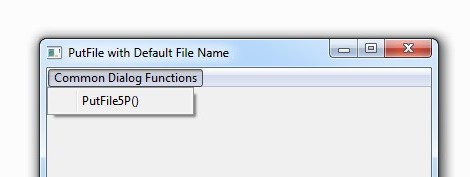
This is a bit modified version of PutFile() (with a small test program); since accept default file name as 5th parameter, name is PutFile5P()
Note : This work is superseded by adding two parameters to official PutFile() function at HMG 3.1.4 2013/06/16.
Happy HMG’ing 😀
~~~~~~~~~~~~~~~~
/*

  HMG Common Dialog Functions
  PutFile5P() Test prg.

*/
#include "hmg.ch"
PROCEDURE Main()
  LOCAL nTask
  DEFINE WINDOW Win_1 ;
     AT 0,0 ;
     WIDTH 400 ;
     HEIGHT 400 ;
     TITLE 'PutFile with Default File Name' ;
     MAIN
     DEFINE MAIN MENU
        POPUP 'Common &Dialog Functions'
           ITEM 'PutFile5P()'ACTION MsgInfo( Putfile5P( ;
                { {'Text Files','*.txt'} },; // 1° acFilter ;
                   'Save Text',;             // 2° cTitle
                   'C:\',;                   // 3° cIniFolder
                   ,;                        // 4° lNoChangeDir
                  "New_Text.TXT" ) )         // 5° cDefaultFileName
       END POPUP
    END MENU
  END WINDOW
  ACTIVATE WINDOW Win_1
RETURN // TestPF5P.PRG
~~~~~~~~~~~~~~~~~~~~~~~~~~~~~~~~~~~~
*-----------------------------------------------------------------------------*
FUNCTION Putfile5P ( aFilter, title, cIniFolder, nochangedir, cDeFilName )
*-----------------------------------------------------------------------------*
   LOCAL c:='' , n

   IF aFilter == Nil
      aFilter := {}
   EndIf

   IF HB_ISNIL( cDeFilName )
      cDeFilName := ''
   ENDIF

   FOR n := 1 TO Len ( aFilter )
       c += aFilter [n] [1] + chr(0) + aFilter [n] [2] + chr(0)
   NEXT

RETURN C_PutFile5P ( c, title, cIniFolder, nochangedir, cDeFilName )
*~~~~~~~~~~~~~~~~~~~~~~~~~~~~~~~~~~~~~~~~~~~~~~~~~~~~~~~~~~~~~~~~~~~~~~~~~~~~~~~~
#pragma BEGINDUMP
#define HB_OS_WIN_USED
#define _WIN32_WINNT 0x0400
#include <windows.h>
#include "hbapi.h"
#include "hbapiitm.h"

HB_FUNC ( C_PUTFILE5P )
{

 OPENFILENAME ofn;

 char buffer[512];

 int flags = OFN_FILEMUSTEXIST | OFN_EXPLORER ;

 if ( hb_parl(4) )
 {
 flags = flags | OFN_NOCHANGEDIR ;
 }

 if( strlen( hb_parc( 5 ) ) != 0 )
 strcpy( buffer, hb_parc( 5 ) );
 else
 strcpy( buffer, "" );

 memset( (void*) &ofn, 0, sizeof( OPENFILENAME ) );
 ofn.lStructSize = sizeof(ofn);
 ofn.hwndOwner = GetActiveWindow() ;
 ofn.lpstrFilter = hb_parc(1) ;
 ofn.lpstrFile = buffer;
 ofn.nMaxFile = 512;
 ofn.lpstrInitialDir = hb_parc(3);
 ofn.lpstrTitle = hb_parc(2) ;
 ofn.Flags = flags;

 if( GetSaveFileName( &ofn ) )
 {
 hb_retc( ofn.lpstrFile );
 }
 else
 {
 hb_retc( "" );
 }
}
#pragma ENDDUMP
/*
From Harbour changelog (at 2007-04-04 10:35 UTC+0200 By Przemyslaw Czerpak )
Added set of functions to manipulate string tokens:
HB_TOKENCOUNT( <cString>, [ <cDelim> ], [ <lSkipStrings> ],
 [ <lDoubleQuoteOnly> ] ) -> <nTokens>

 HB_TOKENGET( <cString>, <nToken>, [ <cDelim> ], [ <lSkipStrings> ],
 [ <lDoubleQuoteOnly> ] ) -> <cToken>

 HB_TOKENPTR( <cString>, @<nSkip>, [ <cDelim> ], [ <lSkipStrings> ],
 [ <lDoubleQuoteOnly> ] ) -> <cToken>

 HB_ATOKENS( <cString>, [ <cDelim> ], [ <lSkipStrings> ],
 [ <lDoubleQuoteOnly> ] ) -> <aTokens>

 All these functions use the same method of tokenization. They can
 accept as delimiters string longer then one character. By default
 they are using " " as delimiter. " " delimiter has special mening

 Unlike other delimiters repeted ' ' characters does not create empty
 tokens, f.e.:

 HB_ATOKENS( " 1 2 3 " ) returns array:
 { "1", "2", "3" }

 Any other delimiters are restrictly counted, f.e.:

 HB_ATOKENS( ",,1,,2,") returns array:
 { "", "", "1", "", "2", "" }
And a strong suggession made at 2009-12-09 21:25 UTC+0100 ( By Przemyslaw Czerpak )
I strongly suggest to use hb_aTokens() and hb_token*() functions.
 They have more options and for really large data many times
 (even hundreds times) faster.

*/
#define CRLF HB_OsNewLine()
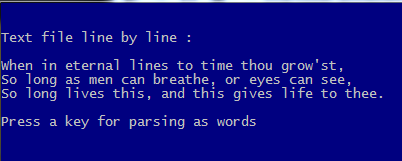
PROCEDURE Main()
LOCAL cTextFName := "Shakespeare.txt",;
 c1Line

 SET COLO TO "W/B"
 SetMode( 40, 120 )

 CLS

 HB_MEMOWRIT( cTextFName,;
 "When in eternal lines to time thou grow'st," + CRLF + ;
 "So long as men can breathe, or eyes can see," + CRLF + ;
 "So long lives this, and this gives life to thee." )

 aLines := HB_ATOKENS( MEMOREAD( cTextFName ), CRLF )

 ?
 ? "Text file line by line :"
 ?
 AEVAL( aLines, { | c1Line | QOUT( c1Line ) } )
 ?
 WAIT "Press a key for parsing as words"
 CLS
 ?
 ? "Text file word by word :"
 ?
 FOR EACH c1Line IN aLines
 a1Line := HB_ATOKENS( c1Line )
 AEVAL( a1Line, { | c1Word | QOUT( c1Word ) } )
 NEXT
 ?
 WAIT "Press a key for parsing directly as words"
 CLS
 ?
 ? "Text file directly word by word :"
 ?
 aWords := HB_ATOKENS( MEMOREAD( cTextFName ) )
 AEVAL( aWords, { | c1Word | QOUT( c1Word ) } )

 ?
 @ MAXROW(), 0
 WAIT "EOF TP_Token.prg"

RETURN // TP_Token.Main()
/*
FParse()
Parses a delimited text file and loads it into an array.
Syntax :
FParse( <cFileName>, <cDelimiter> ) --> aTextArray
Arguments :
<cFileName> : This is a character string holding the name of the text file to load
 into an array. It must include path and file extension.
 If the path is omitted from <cFileName>,
 the file is searched in the current directory.

 <cDelimiter> : This is a single character used to parse a single line of text.
 It defaults to the comma.
Return :
The function returns a two dimensional array, or an empty array when the file
cannot be opened.

Description :

 Function FParse() reads a delimited text file and parses each line
 of the file at <cDelimiter>. The result of line parsing is stored in an array.
This array, again, is collected in the returned array,
 making it a two dimensional array
FParse() is mainly designed to read the comma-separated values (or CSV) file format,
 were fields are separated with commas and records with new-line character(s).

Library is : xHb

*/
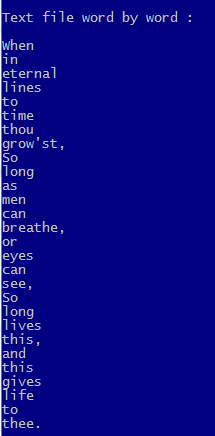
#define CRLF HB_OsNewLine()
PROCEDURE Main()
LOCAL cTextFName := "Shakespeare.txt",;
      a1Line

 SET COLO TO "W/B"
 SetMode( 40, 120 )

 CLS

 HB_MEMOWRIT( cTextFName,;
              "When in eternal lines to time thou grow'st," + CRLF + ;
              "So long as men can breathe, or eyes can see," + CRLF + ;
              "So long lives this, and this gives life to thee." )

 aLines := FParse( cTextFName, " " )

 ?
 ? "Text file word by word :"
 ?
 FOR EACH a1Line IN aLines
    AEVAL( a1Line, { | c1Word | QOUT( c1Word ) } )
 NEXT
 ?
 @ MAXROW(), 0
 WAIT "EOF TP_FParse.prg"

RETURN // TP_FParse.Main()
Consider a table for customers records with two character fields : Customer ID and customer name:
| Cust_ID | Cust_Name |
| CC001 | Pierce Firth |
| CC002 | Stellan Taylor |
| CC003 | Chris Cherry |
| CC004 | Amanda Baranski |
It’s known all possible and necessary operations on a table: APPEND, DELETE, SEEK and so on; by the way, for SEEK we need an index file also.
Listing this table is quite simple:
USE CUSTOMER
WHILE .NOT. EOF()
? CUST_ID, CUST_NAME
DBSKIP()
ENDDO
If our table is sufficiently small, we can find a customer record without index and SEEK :
LOCATE FOR CUST_ID = “CC003”
? CUST_ID, CUST_NAME
If we want all our data will stand in memory and we could manage it more simple and quick way, we would use an array ( with some considerations about size of table; if it is too big, this method will be problematic ) :
aCustomer := {} // Declare / define an empty array
USE CUSTOMER
WHILE .NOT. EOF()
AADD(aCustomer, { CUST_ID, CUST_NAME } )
DBSKIP()
ENDDO
Traversing this array is quite simple :
FOR nRecord := 1 TO LEN( aCustomer )
? aCustomer[ nRecord, 1 ], aCustomer[ nRecord, 2 ]
NEXT
or :
a1Record := {}
FOR EACH a1Record IN aCustomer
? a1Record[ 1 ], a1Record[ 2 ]
NEXT
And locating a specific record too:
nRecord := ASCAN( aCustomer, { | a1Record | a1Record[ 1 ] == “CC003” } )
? aCustomer[ nRecord, 1 ], aCustomer[ nRecord, 2 ]
A lot of array functions are ready to use for maintain this array : ADEL(), AADD(), AINS() etc …
Now, let’s see how we could use a hash for achieve this job :
hCustomer := { => } // Declare / define an empty hash
USE CUSTOMER
WHILE .NOT. EOF()
hCustomer[ CUST_ID ] := CUST_NAME
DBSKIP()
ENDDO
Let’s traversing :
h1Record := NIL
FOR EACH h1Record IN hCustomer
? h1Record: __ENUMKEY(),h1Record:__ENUMVALUE()
NEXT
Now, we have a bit complicate our job; a few field addition to the table :
| No: | Field Name | Type | Width | Dec | Decription |
|
1 |
CUST_ID |
C |
5 |
0 |
Id ( Code ) |
|
2 |
CUST_NAME |
C |
10 |
0 |
Name |
|
3 |
CUST_SNAM |
C |
10 |
0 |
Surname |
|
4 |
CUST_FDAT |
D |
8 |
0 |
First date |
|
5 |
CUST_ACTV |
L |
1 |
0 |
Is active ? |
|
6 |
CUST_BLNCE |
N |
11 |
2 |
Balance |
While <key> part of an element of a hash may be C / D / N / L type; <xValue> part of hash too may be ANY type of data, exactly same as arrays.
So, we can make fields values other than first ( ID) elements of an array:
hCustomer := { => } // Declare / define an empty hash
USE CUSTOMER
WHILE .NOT. EOF()
a1Data:= { CUST_NAME, CUST_SNAM, CUST_FDAT, CUST_ACTV, CUST_BLNCE }
hCustomer[ CUST_ID ] := a1Data
DBSKIP()
ENDDO
Let’s traversing :
h1Record := NIL
FOR EACH h1Record IN hCustomer
a1Key := h1Record:__ENUMKEY()
a1Data := h1Record:__ENUMVALUE()
? a1Key
AEVAL( a1Data, { | x1 | QQOUT( x1 ) } )
NEXT
*-._.-._.-._.-._.-._.-._.-._.-._.-._.-._.-._.-._.-._.-._.-._.-._.-._.-._
/*
Hash vs Tables

*/
#define NTrim( n ) LTRIM( STR( n ) )
#define cLMarj SPACE( 3 )
PROCEDURE Main()

  SET DATE GERM
  SET CENT ON
  SET COLO TO "W/B"
  SetMode( 40, 120 )

  CLS

  hCustomers := { => } // Declare / define an empty PRIVATE hash

  IF MakUseTable()

     Table2Hash()

     * Here the hash hCustomers may be altered in any way

     ZAP

     Hash2Table()

  ELSE
      ? "Couldn't make / USE table"
  ENDIF

  ?
  @ MAXROW(), 0
  WAIT "EOF HashVsTable.prg"

RETURN // HashVsTable.Main()
*-._.-._.-._.-._.-._.-._.-._.-._.-._.-._.-._.-._.-._.-._.-._.-._.-._.-._.-._.-._.-._.-._.-._.-._.-._.
PROCEDURE Table2Hash()
   hCustomers := { => }
   WHILE .NOT. EOF()
     hCustomers[ CUST_ID ] := CUST_SNAM
     DBSKIP()
   ENDDO

   ListHash( hCustomers, "A hash transferred from a table (single value)" )

   hCustomers := { => } // Declare / define an empty hash
   DBGOTOP()
   WHILE .NOT. EOF()
      hCustomers[ CUST_ID ] := { CUST_NAME, CUST_SNAM, CUST_FDAT, CUST_ACTV, CUST_BLNCE }
      DBSKIP()
   ENDDO

   ListHash( hCustomers, "A hash transferred from a table (multiple values)" )

RETURN // Table2Hash()

*-._.-._.-._.-._.-._.-._.-._.-._.-._.-._.-._.-._.-._.-._.-._.-._.-._.-._.-._.-._.-._.-._.-._.-._.-._.

PROCEDURE Hash2Table()
   LOCAL h1Record,;
         c1Key,;
         a1Record,;
         n1Field

   FOR EACH h1Record IN hCustomers
      c1Key := h1Record:__ENUMKEY()
      a1Record := h1Record:__ENUMVALUE()
      DBAPPEND()
      FIELDPUT( 1, c1Key )
      AEVAL( a1Record, { | x1, n1 | FIELDPUT( n1 + 1 , x1 ) } )
   NEXT h1Record
   DBGOTOP()

   ?
   ? "Data trasferred from hash to table :"
   ?
   WHILE ! EOF()
      ? STR( RECN(), 5), ''
      FOR n1Field := 1 TO FCOUNT()
         ?? FIELDGET( n1Field ), ''
      NEXT n1Field
      DBSKIP()
   ENDDO

RETURN // Hash2Table()

*-._.-._.-._.-._.-._.-._.-._.-._.-._.-._.-._.-._.-._.-._.-._.-._.-._.-._.-._.-._.-._.-._.-._.-._.-._.

PROCEDURE ListHash( hHash, cComment )

  LOCAL x1Pair

  cComment := IF( HB_ISNIL( cComment ), '', cComment )

  ?
  ? cComment // , "-- Type :", VALTYPE( hHash ), "size:", LEN( hHash )
  ?
  IF HB_ISHASH( hHash )
     FOR EACH x1Pair IN hHash
        nIndex := x1Pair:__ENUMINDEX()
        x1Key := x1Pair:__ENUMKEY()
        x1Value := x1Pair:__ENUMVALUE()
        ? cLMarj, NTrim( nIndex )
*       ?? '', VALTYPE( x1Pair )
        ?? '', x1Key, "=>"
*       ?? '', VALTYPE( x1Key )
*       ?? VALTYPE( x1Value )
        IF HB_ISARRAY( x1Value )
           AEVAL( x1Value, { | x1 | QQOUT( '', x1 ) } )
        ELSE
           ?? '', x1Value
        ENDIF
     NEXT
  ELSE
    ? "Data type error; Expected hash, came", VALTYPE( hHash )
  ENDIF HB_ISHASH( hHash )
RETURN // ListHash()
*-._.-._.-._.-._.-._.-._.-._.-._.-._.-._.-._.-._.-._.-._.-._.-._.-._.-._.-._.-._.-._.-._.-._.-._.-._.

FUNCTION MakUseTable() // Make / USE table

 LOCAL cTablName := "CUSTOMER.DBF"
 LOCAL lRetval, aStru, aData, a1Record

 IF FILE( cTablName )
    USE (cTablName)
 ELSE
    aStru := { { "CUST_ID", "C", 5, 0 },;
               { "CUST_NAME", "C", 10, 0 },;
               { "CUST_SNAM", "C", 10, 0 },;
               { "CUST_FDAT", "D", 8, 0 },;
               { "CUST_ACTV", "L", 1, 0 },;
               { "CUST_BLNCE", "N", 11, 2 } }
    *
    * 5-th parameter of DBCREATE() is alias -
    * if not given then WA is open without alias
    *                              ^^^^^^^^^^^^^
    DBCREATE( cTablName, aStru, , .F., "CUSTOMER" )

    aData := { { "CC001", "Pierce", "Firth", 0d20120131, .T., 150.00 },;
               { "CC002", "Stellan", "Taylor", 0d20050505, .T., 0.15 },;
               { "CC003", "Chris", "Cherry", 0d19950302, .F., 0 },;
               { "CC004", "Amanda", "Baranski", 0d20011112, .T., 12345.00 } }

    FOR EACH a1Record IN aData
        CUSTOMER->(DBAPPEND())
        AEVAL( a1Record, { | x1, nI1 | FIELDPUT( nI1, X1 ) } )
    NEXT a1Record
    DBGOTOP()

 ENDIF

 lRetval := ( ALIAS() == "CUSTOMER" )

RETURN lRetval // MakUseTable()

*-._.-._.-._.-._.-._.-._.-._.-._.-._.-._.-._.-._.-._.-._.-._.-._.-._.-._

Definition:
In general, a Hash Table, or Hash Array, or Associative array, or shortly Hash is an array- like data structure, to store some data with an associated key for each; so, ‘atom’ of a hash is a pair of a ‘key’ with a ‘value’. A hash system needs to perform at least three operations:
– add a new pair,
– access to value via key
– the search and delete operations on a key pair
In Harbour, a hash is simply a special array, or more precisely a “keyed” array with special syntax with a set of functions.
Building:
The “=>” operator can be used to indicate literally the relation between <key> <value> pair: <key> => <value>
We can define and initialize a hash by this “literal” way :
hDigits_1 := { 1 => 1, 2 => 2, 3 => 3, 4 => 4 }
or by a special function call:
hDigits_1 := HB_HASH( 1, 1, 2, 2, 3, 3, 4, 4 )
Using “add” method may be another way :
hDigits_1 := { => } // Build an empty hash
hDigits_1[ 1] := 1
hDigits_1[ 2] := 2
hDigits_1[ 3] := 3
hDigits_1[ 4] := 4
In this method while evaluating each of above assignments, if given key exits in hash, will be replaced its value; else add a new pair to the hash.
In addition, data can be added to a hash by extended “+=” operator:
hCountries := { 'Argentina' => "Buenos Aires" }
hCountries += { 'Brasil' => "Brasilia" }
hCountries += { 'Chile' => "Santiago" }
hCountries += { 'Mexico' => "Mexico City" }
Hashs may add ( concatenate ) each other by extended “+” sign :
   hFruits := { "fruits" => { "apple", "chery", "apricot" } }
   hDays   := { "days"   => { "sunday", "monday" } }
   hDoris := hFruits + hDays

Note:  This “+” and “+=” operators depends xHB lib and needs to xHB lib and xHB.ch.
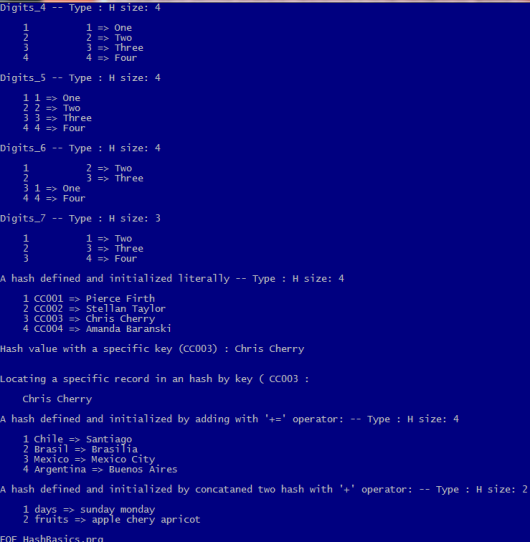
Typing :
<key> part of a hash may be any legal scalar type : C, D, L, N; and <value> part may be in addition scalar types, any complex type ( array or hash ).
Correction : This definition is wrong ! The correct is :
<key> entry key; can be of type: number, date, datetime, string, pointer.
Corrected at : 2015.12.08; thanks to Marek.
hDigits_2 := { 1 => “One”, 2 => “Two”, 3 => “Three”, 4 => “Four” }
hDigits_3 := { "1" => "One", "2" => "Two", "3" => "Three", "4" => "Four" }
hDigits_4 := { "1" => "One", 2 => "Two", 3 => "Three", "4" => "Four" }
hDigits_5 := { 1 => "One", 1 => "Two", 3 => "Three", 4 => "Four"
All of these examples are legal. As a result, a pair record of a hash may be:
– Numeric key, numeric value ( hDigits_1 )
– Numeric key, character value ( hDigits_2 )
– Character key, character value ( hDigits_3 )
– Mixed type key ( hDigits_4 )
Duplicate keys (as seen in hDigits_5) is permitted to assign, but not give a result such as double keyed values: LEN( hDigits_5 ) is 3, not 4; because first pair replaced by second due to has same key.
Consider a table-like data for customers records with two character fields: Customer ID and customer name:
| Cust_ID | Cust_Name |
| CC001 | Pierce Firth |
| CC002 | Stellan Taylor |
| CC003 | Chris Cherry |
| CC004 | Amanda Baranski |
We can build a hash with this data :
hCustomers := { "CC001" => "Pierce Firth",;
"CC002" => "Stellan Taylor",;
"CC003" => "Chris Cherry",;
"CC004" => "Amanda Baranski" }
and list it:
?
? "Listing a hash :"
?
h1Record := NIL
FOR EACH h1Record IN hCustomers
? cLMarj, h1Record:__ENUMKEY(), h1Record:__ENUMVALUE()
NEXT
Accessing a specific record is easy :
 hCustomers[ "CC003" ] // Chris Cherry
*-._.-._.-._.-._.-._.-._.-._.-._.-._.-._.-._.-._.-._.-._.-._.-._.-._.-._.-._.-._.-._.-._.-._.-._.-._.
/*
Hash Basics

*/
#include "xhb.ch"
#define NTrim( n ) LTRIM( STR( n ) )
PROCEDURE Main()
 SET DATE GERM
 SET CENT ON
 SET COLO TO "W/B"

 cLMarj := SPACE( 3 )

 CLS

 hDigits_1 := { => } // Build an empty hash

 hDigits_1[ 1 ] := 1
 hDigits_1[ 2 ] := 2
 hDigits_1[ 3 ] := 3
 hDigits_1[ 4 ] := 4

 ListHash( hDigits_1, "Digits_1" )

 hDigits_2 := HB_HASH( 1, 1, 2, 2, 3, 3, 4, 4 )

 ListHash( hDigits_2, "Digits_2" )

 hDigits_3 := { 1 => 1,;
 2 => 2,;
 3 => 3,;
 4 => 4 }
 ListHash( hDigits_3, "Digits_3" )

 hDigits_4 := { 1 => "One",;
 2 => "Two",;
 3 => "Three",;
 4 => "Four" }
ListHash( hDigits_4, "Digits_4" )

 hDigits_5 := { "1" => "One",;
 "2" => "Two",;
 "3" => "Three",;
 "4" => "Four" }
 ListHash( hDigits_5, "Digits_5" )

 hDigits_6 := { "1" => "One",;
 2 => "Two",;
 3 => "Three",;
 "4" => "Four" }
 ListHash( hDigits_6, "Digits_6" )

 hDigits_7 := { 1 => "One",;
 1 => "Two",; // This line replace to previous due to same key
 3 => "Three",;
 4 => "Four" }
 ListHash( hDigits_7, "Digits_7" )

 * WAIT "EOF digits"

 hCustomers := { "CC001" => "Pierce Firth",;
 "CC002" => "Stellan Taylor",;
 "CC003" => "Chris Cherry",;
 "CC004" => "Amanda Baranski" }
 ListHash( hCustomers, "A hash defined and initialized literally" )
 ?
 ? "Hash value with a specific key (CC003) :", hCustomers[ "CC003" ] // Chris Cherry
 ?
 cKey := "CC003"
 ?
 ? "Locating a specific record in an hash by key (", cKey, ":"
 ?
 c1Data := hCustomers[ cKey ]
 ? cLMarj, c1Data

 hCountries := { 'Argentina' => "Buenos Aires" }
 hCountries += { 'Brasil' => "Brasilia" }
 hCountries += { 'Chile' => "Santiago" }
 hCountries += { 'Mexico' => "Mexico City" }

 ListHash( hCountries, "A hash defined and initialized by adding with '+=' operator:" )

 hFruits := { "fruits" => { "apple", "chery", "apricot" } }
 hDays := { "days" => { "sunday", "monday" } }

 hDoris := hFruits + hDays

 ListHash( hDoris, "A hash defined and initialized by concataned two hash with '+' operator:" )

 ?
 @ MAXROW(), 0
 WAIT "EOF HashBasics.prg"

RETURN // HashBasics.Main()
*-._.-._.-._.-._.-._.-._.-._.-._.-._.-._.-._.-._.-._.-._.-._.-._.-._.-._.-._.-._.-._.-._.-._.-._.-._.
PROCEDURE ListHash( hHash, cComment )

 LOCAL x1Pair := NIL

 cComment := IF( HB_ISNIL( cComment ), '', cComment )

 ?
 ? cComment, "-- Type :", VALTYPE( hHash ), "size:", NTrim ( LEN( hHash ) )
 ?
 FOR EACH x1Pair IN hHash
    nIndex := x1Pair:__ENUMINDEX()
    x1Key := x1Pair:__ENUMKEY()
    x1Value := x1Pair:__ENUMVALUE()
    ? cLMarj, NTrim( nIndex )
*   ?? '', VALTYPE( x1Pair )
    ?? '', x1Key, "=>"
*   ?? '', VALTYPE( x1Key )
*   ?? VALTYPE( x1Value )
    IF HB_ISARRAY( x1Value )
       AEVAL( x1Value, { | x1 | QQOUT( '', x1 ) } )
    ELSE
       ?? '', x1Value
    ENDIF
 NEXT

RETURN // ListHash()
*-._.-._.-._.-._.-._.-._.-._.-._.-._.-._.-._.-._.-._.-._.-._.-._.-._.-._.-._.-._.-._.-._.-._.-._.-._.