This document attempts to describe the features separating Harbour from
CA-Cl*pper.

/* TODO: @FunPointer(), and all other Harbour extensions. */

Harbour Macro Compiler
----------------------
The Harbour Macro Compiler offers 2 additional layers of functionality
controlled by means of hb_SetMacro()* function, not available in CA-Cl*pper.

hb_SetMacro( HB_SM_HARBOUR, .T. ) will enable macro compilation and
evaluation of complex expressions not supported by CA-Cl*pper like:

 - exp++, exp--, var += exp, (exp), etc..
 - Nested codeblocks.
 - Expressions longer then 254 characters.

hb_SetMacro( HB_SM_XBASE, .T. ) will enable macro compilation and
evaluation of comma separated lists in all contexts where lists are
acceptable by CA-Cl*pper*, including:

  - { &cMacro } // Literal array elements list.
  - SomeArray[ &cMacro ] // Array index list.
  - SomeFun( &cMacro ) // Arguments list.
  - ( &cMacro ) // parenthesized list expression.

*CA-Cl*pper only supports list macros within codeblocks context.

Both these extra layers are activated by default.

* See also -k Compiler switch.

LIST Command
------------

LIST &cMacro

LIST in CA-Cl*pper [superficially] supports macros of lists expressions.
No error will be produced, and all expressions in the list will be
evaluated, but *only* the *last* expression will be displayed. This is
not documented in either the LIST Command or the Macro Operator
descriptions, but is the de-facto behavior in all CA-Cl*pper 5.x versions.

Harbour instead will not only evaluate all of the expressions in
such list macro, but will also display all such values. This default
behavior may be disabled with hb_SetMacro( HB_SM_XBASE, .F. )*

* See also -k Compiler switch.

INIT/EXIT and startup procedures
--------------------------------

In CA-Cl*pper the startup procedure is always the first procedure/function
of the main module, even if such symbol is an INIT or EXIT symbol. In
such case the program will never execute the "main" symbol. In Harbour
the first *non* INIT/EXIT symbol, will be executed as the main symbol
after all INIT procedures have been executed.

FOR EACH statement
------------------
Harbour has support enumeration loop with the following syntax:

   FOR EACH var1 [,var255] IN expr1 [,expr255] [DESCEND]
      [EXIT]
      [LOOP]
      ...
   NEXT

Note:
   - expr can be a string or an array
   - enumerator variable 'var<n>' stores a reference to the element of
     an array or a string specified by 'expr<n>' thus assigments to the
     enumerator changes the value of given array element
   - after the loop the controlling variable(s) store the value which
     they had before entering the loop
   - the enumeraqtor variable supports the following properties
     :__enumindex - the loop counter for variable
     :__enumbase  - the value that is being traversed
     :__enumvalue - the value of variable

for example:
   a := 'A'
   b := 'B'
   FOR EACH a, b IN { 1, 2, 3, 4 }, "abcd"
      ? a, b   //prints: 1 a
               //        2 b
               //        3 c
               //        4 d
   NEXT
   ? a, b   //prints: A B

   // you can use EXIT statement inside the loop
   FOR EACH a IN { 1, 2, 3, 4 }
      IF a:__enumindex == 3
         ? a
         EXIT
      ENDIF
   NEXT

   arr := { 1, 2, 3 }
   str := "abc"
   FOR EACH a, b IN arr, str
      a *= 2
      str := Upper( str )
   NEXT
   // now 'arr' stores { 2, 4, 6 }
   // howerer 'str' still stores "abc"

Notice the difference:
   FOR EACH a IN someValue
      ? a:__enumindex   //prints current value of the index
      ? (a):__enumindex //sends '__enumindex' message to the current value
   NEXT

WITH OBJECT
-----------
Harbour supports the following statement:

   WITH OBJECT expression
      ...
   ENDWITH

   Inside this WITH OBJECT/END enclosure you can use the simplified
   form of sending messages to the object. You can use the syntax
   :message( [params] )
   :property
   to send messages to the object specified by 'expression'

for example:
   WITH OBJECT myobj:a[ 1 ]:myitem
      :message( 1 )
      :value := 9
   ENDWITH

   The above code is equivalent to:
   myobj:a[ 1 ]:myitem:message( 1 )
   myobj:a[ 1 ]:myitem:value := 9

   Inside WITH OBJECT/END you can access (or even assign a new object)
   using a special reserved property :__withobject

       The runtime error will be generated at the time of message
       sending (or property access/assign) if <objexpression>
       is not a value of type object.

for example:
   CREATE CLASS foo
      VAR name INIT 'FOO'
   ENDCLASS

   CREATE CLASS bar
      VAR name INIT 'BAR'
   ENDCLASS

   WITH OBJECT foo():new()
      ? :name                 //prints 'FOO'
      ? :__withobject:name    //also prints 'FOO'
      ? :__withobject := bar():new()
      ? :name                 //prints 'BAR'
   ENDWITH

Source : https://github.com/harbour/core/blob/master/doc/clipper.txt
Tag Archives: LIST command
HbRun
HbRun is a console interpreter and program ( command file / script file / .prg / .hrb ) runner for the Harbour Language.
Addendum: a clarification by Przemek:
HBRUN is a simple wrapper to Harbour compiler so the same syntax as in
Cl*pper is supported:
DO <filename>[.prg]
only .prg is accepted as extension and it’s default so you do not
have to set it explicitly.
( In Harbour Users Google group, under “hbmk2 and the Dot Prompt” topic:
It can work as interpreter when invoked without parameters or can execute xBase / Harbour source code in .prg file or compiled Harbour Portable Objects (.hrb) file given as parameter.
Type of file is recognized by extension used with <file> parameter. If not given then .hrb is used.
In other words, HbRun can be use in both interpret and batch mode.
Regarding parameter given or not, when calling HbRun this ‘mode’ determined by program itself. If a parameter ( usually a .prg or .hrb file name ) given, program run in ‘batch’ mode, runs (executes) given script file and end. If no parameter given, program enter interpreter mode.
Using HbRun as an interpreter, may be very useful, productive, and educative for xBase programmers. Too many xBase programmers was learned everything, including DBF file system and xBase programming language by famous “dot prompt”. Today many xBase programmers uses HbRun daily basis.
When HbRun begin, open a console screen with two basic area: status bars at top and dot prompt line at bottom.
Status bars :
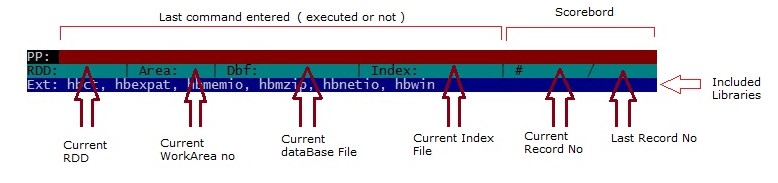
Dot prompt is quite simple visually: a dot and a line in inverse color beginning with a blinking cursor :

You may enter here a command to see the result.
For example “DIR” command will give a list of database (.dbf) files in current directory:
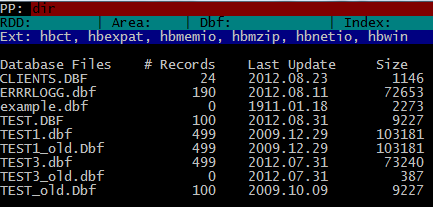
SET COLO TO “GR+/N” command will remember you old days :

The DIR command can be used with DOS style “filter / skeleton” parameter :
DIR *.PRG
DIR *.*
etc.
Inspecting any table ( .dbf file ) is very simple:
USE CLIENTS
BROWSE ()

Expand a little:
SET COLO TO “GB+/N”
USE CLIENTS
BROWSE( 3, 10, 24, 60 )

If you plan to use this snap frequently, make a .prg file (say brwclien.prg) with this three line and run it with DO command:
DO BRWCLIEN
Sometime LIST command may be better:
LIST CL_ID, CLI_SNAM, CLI_NAME, CLI_TLF
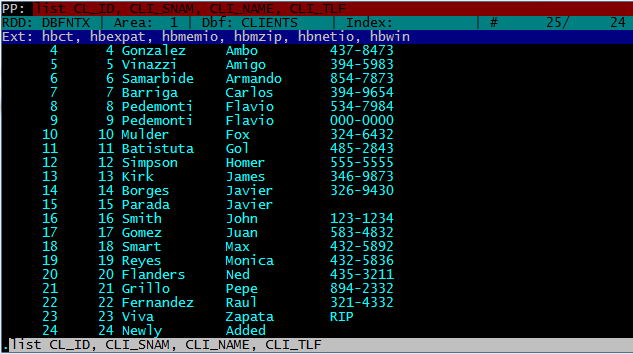
You can add FOR clause to the LIST command:
LIST CL_ID, CLI_SNAM, CLI_NAME, CLI_TLF FOR RECN() < 10
or
LIST CL_ID, CLI_SNAM, CLI_NAME, CLI_TLF FOR EMPTY( CLI_TLF )
The structure info of a table frequently requires while daily work to xBase Programmers.
Here three small programs for obtain structure info of a table. Usage is quite simple: open ( USE ) your table and enter DO <prgFileName>; for example:
USE CLIENT
DO LISTSTRU
or
DO DISPSTRU
or
DO SAVESTRU
Notes :
– To avoid some possible screen metric conflicts caused by default console (DOS box) settings of OS, may be useful some adjusting before invoke HbRun; such as:
MODE CON LINES=48 COLS=128
– “?” command may be useful as a built-in calculator :
? 2*2 // 4
? 2**8 // 256
? SQRT( 81 ) // 9
– HbRun keep a “history” for commands entered (for a limited count of commands of course). You can access (and re-enter when required) by using up and down keys. Moreover this history may be usable after re-invoke HbRun.
– Though Harbour Language is essential, some legal Harbour commands / functions may be un-recognizable by HbRun.
– Though some legal statements works in interpret mode, may not works in batch mode (such as Browse() ).
Last Note : No further explanation required for experienced xBase programmers; try, see and learn.
~~~~~~~~~~~~~~~~~~~~~~~~~~~~~~~~~~~~~~~~~~~~~~~~~~~~
Examples :
/*
 DispStru.prg

 Display structure of current table ( .dbf file ) on screen.

*/
MEMVAR ASTRUCT, NTOTLEN
IF EMPTY( ALIAS() )
   SETCOLOR( "R/N" )
   ? "No active table in the current work area !", LTRIM( STR( SELECT() ) )
ELSE
   @ 3, 0 CLEA TO MAXROW() - 1, MAXCOL()
   aStruct := DBSTRUCT()
   nTotLen := 1
   AEVAL( aStruct, { | a1Field | nTotLen += a1Field[ 3 ] } )
   AEVAL( aStruct, { | a1Field, n1FieldNo | ;
   aStruct[ n1FieldNo ] := STR( n1FieldNo, 3 ) + " " +;
                           PADR( a1Field[ 1 ], 12 ) +;
                           PADC( a1Field[ 2 ], 4 ) +;
                           PADL( a1Field[ 3 ], 5 ) +;
                           PADL( a1Field[ 4 ], 3 ) } )
   ? "Structure of database :", DBINFO( 10 )
   ? "Number of data records :", LTRIM( STR( LASTREC() ) )
   ? "Date of last update :", LUPDATE()
   ? "Fld Name Type Width Dec"
   ? "--- ---------- ---- ----- ---"
   @ 21,0 SAY "** Total ** " + PADL( nTotLen, 6 )
   ACHOICE( 8, 0, 20, 30, aStruct )
ENDIF
~~~~~~~~~~~~~~~~~~~~~~~~~~~~~~~~~~~~~~~~~~~~~~~~~~~~
/*
 ListStru.prg

 List structure of current table ( .dbf file ) on screen.

*/
MEMVAR ASTRUCT, NTOTLEN
IF EMPTY( ALIAS() )
   SETCOLOR( "R/N" )
   ? "No active table in the current work area !", LTRIM( STR( SELECT() ) )
ELSE
   @ 3, 0 CLEA TO MAXROW() - 1, MAXCOL()
   aStruct := DBSTRUCT()
   nTotLen := 1
   AEVAL( aStruct, { | a1Field | nTotLen += a1Field[ 3 ] } )
   AEVAL( aStruct, { | a1Field, n1FieldNo | ;
   aStruct[ n1FieldNo ] := STR( n1FieldNo, 3 ) + " " +;
                           PADR( a1Field[ 1 ], 12 ) +;
                           PADC( a1Field[ 2 ], 4 ) +;
                           PADL( a1Field[ 3 ], 5 ) +;
                           PADL( a1Field[ 4 ], 3 ) } )
   ? "Structure of database :", DBINFO( 10 )
   ? "Number of data records :", LTRIM( STR( LASTREC() ) )
   ? "Date of last update :", LUPDATE()
   ? "Fld Name Type Width Dec"
   ? "--- ---------- ---- ----- ---"
   AEVAL( aStruct, { | c1Field | QOUT( c1Field ) } )
   ? "** Total ** ", PADL( nTotLen, 5 )
ENDIF
~~~~~~~~~~~~~~~~~~~~~~~~~~~~~~~~~~~~~~~~~~~~~~~~~~~~
/*
SaveStru.prg

 Save structure of current table ( .dbf file ) to a file.

 Notes :

 - This program uses ListStru.prg
 - Name of target file constructed at line 18;
   if required you may use alternate ways or
   simply using a constant.
*/
MEMVAR AlteFName
IF EMPTY( ALIAS() )
   SETCOLOR( "R/N" )
   ? "No active table in the current work area !", LTRIM( STR( SELECT() ) )
ELSE
   AlteFName := LEFT( ALIAS(), 4 ) + "STRU"
   SET ALTE TO &AlteFName
   SET ALTE ON
   DO LISTSTRU
   SET ALTE OFF
   SET ALTE TO
ENDIF
~~~~~~~~~~~~~~~~~~~~~~~~~~~~~~~~~~~~~~~~~~~~~~~~~~~~
