Page 1 of 2
Grid syncronizing with dbf
Posted: Wed Apr 08, 2020 2:56 pm
by mlnr
Hi all,
Which is the best and most simple way for editing grid while syncronizing with DBF at the same time?
I use EDITOPTION GRID_EDIT_REPLACEALL
When i add a new record in grid i want to fill the DBF with other datas, not only with the ones in grid.
DBF has more fields than grid, and I use every value from the DBF fields.
Should i use another ARRAY for the other values?
Could you give me any tips?
Re: Grid syncronizing with dbf
Posted: Fri Apr 10, 2020 9:42 pm
by andyglezl
When i add a new record in grid i want to fill the DBF with other datas, not only with the ones in grid.
DBF has more fields than grid, and I use every value from the DBF fields.
Hola
Yo utilizo el GRID solo para buscar y filtrar, (y con algunas Bases de Datos pequeñas)
y una "forma" para Editar o añadir solo (o todos) los campos que quiero.
*--------------------------------------------------------------------------------------------------------
Hi there
I use GRID only to search and filter, (and with some small Databases)
and a "form" to Edit or add only (or all) the fields I want.
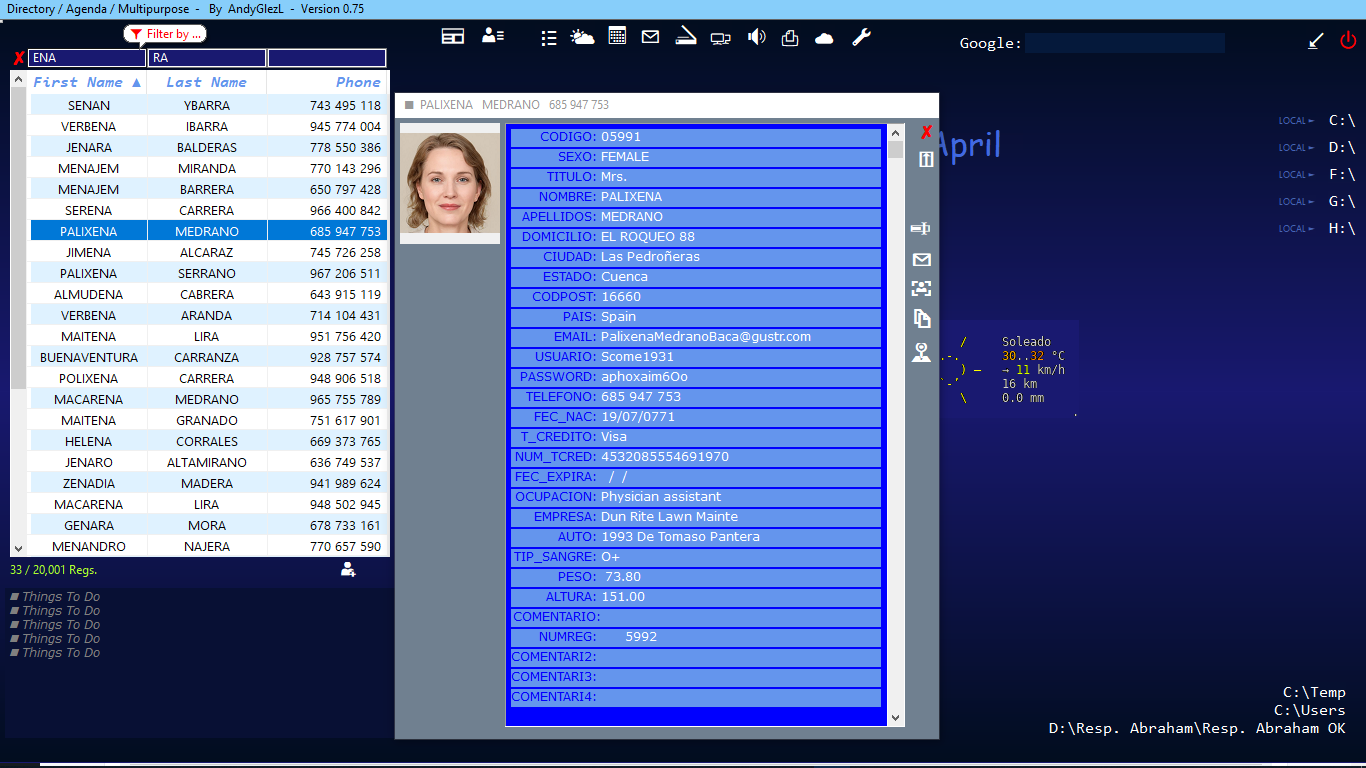
- SearchGrid.png (122.13 KiB) Viewed 2376 times
Re: Grid syncronizing with dbf
Posted: Sat Apr 11, 2020 5:25 am
by mol
By the way - if you are using grid to enter various types of data, how about different formats for rows - dateds, numbers, strings? Do you have your own control system ?
Re: Grid syncronizing with dbf
Posted: Sat Apr 11, 2020 4:31 pm
by franco
What are you using the grid for.
An example where I use a grid is on a sales invoice. which has a (inv_item) table related to an (inventory) table.
If you want to modify a complete table you may want to use (edit) or (your table program) , from a button on your grids window.
Re: Grid syncronizing with dbf
Posted: Sun Apr 12, 2020 2:30 pm
by mlnr
Thank you guys for your answers.
I would like to use grid without form to Edit.
Something like this (same as Excel table):
Code: Select all
#include "hmg.ch"

Function Main

public aRows [21] [3]

   aRows [1]   := {'Simpson','Homer','555-5555'}
   aRows [2]   := {'Mulder','Fox','324-6432'}
   aRows [3]   := {'Smart','Max','432-5892'}
   aRows [4]   := {'Grillo','Pepe','894-2332'}
   aRows [5]   := {'Kirk','James','346-9873'}
   aRows [6]   := {'Barriga','Carlos','394-9654'}
   aRows [7]   := {'Flanders','Ned','435-3211'}
   aRows [8]   := {'Smith','John','123-1234'}
   aRows [9]   := {'Pedemonti','Flavio','000-0000'}
   aRows [10]   := {'Gomez','Juan','583-4832'}
   aRows [11]   := {'Fernandez','Raul','321-4332'}
   aRows [12]   := {'Borges','Javier','326-9430'}
   aRows [13]   := {'Alvarez','Alberto','543-7898'}
   aRows [14]   := {'Gonzalez','Ambo','437-8473'}
   aRows [15]   := {'Batistuta','Gol','485-2843'}
   aRows [16]   := {'Vinazzi','Amigo','394-5983'}
   aRows [17]   := {'Pedemonti','Flavio','534-7984'}
   aRows [18]   := {'Samarbide','Armando','854-7873'}
   aRows [19]   := {'Pradon','Alejandra','???-????'}
   aRows [20]   := {'Reyes','Monica','432-5836'}
   aRows [21]   := {'Fernández','two','0000-0000'}

   FOR i = 1 TO 21
     AADD (aRows[i],str(i))
   NEXT

   DEFINE WINDOW Form_1 ;
      AT 0,0 ;
      WIDTH 800 ;
      HEIGHT 650 ;
      TITLE "CELLNAVIGATION";
      MAIN

      @ 10,10 GRID Grid_1 ;
         WIDTH 760 ;
         HEIGHT 590 ;
         HEADERS {'Last Name','First Name','Phone',"Num"} ;
         WIDTHS {140,140,140,50};
         ITEMS aRows ;
         VALUE 1;
         EDIT;
         CELLNAVIGATION;
         EDITOPTION GRID_EDIT_REPLACEALL

         Form_1.Grid_1.ColumnCONTROL (4) := {"TEXTBOX", "NUMERIC",NIL,NIL}
         Form_1.Grid_1.ColumnJUSTIFY (4) := GRID_JTFY_RIGHT

   END WINDOW

   CENTER WINDOW Form_1

   ACTIVATE WINDOW Form_1

Return
What are you using the grid for.
An example where I use a grid is on a sales invoice. which has a (inv_item) table related to an (inventory) table.
Yes Franco, similar.
If you want to modify a complete table you may want to use (edit) or (your table program) , from a button on your grids window.
What do you think?
Re: Grid syncronizing with dbf
Posted: Sun Apr 12, 2020 4:53 pm
by franco
I think I would use a BROWSE instead of GRID and set browsesync on.
Browse is much faster on large tables and I think browsesync updates only the record you are on.
Re: Grid syncronizing with dbf
Posted: Sun Apr 12, 2020 8:26 pm
by mlnr
You are right Franco and thank you, but i need to use the CELLNAVIGATION and INPLACEEDIT like in Excel. So the GRID would be good for me. I will try to sync the grid and the DBF at the same time. I wondered if anyone had experience or a simple idea.
Re: Grid syncronizing with dbf
Posted: Mon Apr 13, 2020 6:32 am
by mol
Some years ago I've tried to replace browse with grid. Without success. In my opinion grid is unusable for large dbf tables.
Re: Grid syncronizing with dbf
Posted: Mon Apr 13, 2020 10:13 am
by mlnr
mol wrote: ↑Mon Apr 13, 2020 6:32 am
Some years ago I've tried to replace browse with grid. Without success. In my opinion grid is unusable for large dbf tables.
Yes, i've tried too, that is what i want to use grid with array and handle DBF separately next to it.
Re: Grid syncronizing with dbf
Posted: Mon Apr 13, 2020 11:39 am
by serge_girard
Gabor,
You can load DBF-data into an array and then show in a grid. Better is to minimize number of records by having a filter system or/and a paging system. With paging you only have 20 or 50 or x items per page. Extremly fast but tricky to to realise (with DBF). In MySQL you can limit slsection output with page item numbers :
Code: Select all
page1
SELECT key1, field2, field3, field4
FROM table
WHERE field2 like '%something%'
ORDER BY key1
LIMIT 0, 40

page2
LIMIT 40, 40

page3
LIMIT 80, 40

cQuery2 += "LIMIT " + ALLTRIM(STR(nSTART)) + ", "  + ALLTRIM(STR(nROWS_PER_PAGE)) + " "   +  CRLF
You will need buttons etc. in order to navigate from first page to next page, to last page, prev. page OR directly to a page. I can help you with this.
Serge