WINDOW WITH scrollbars
Moderator: Rathinagiri
-
tomtagaris

- Posts: 117
- Joined: Tue Aug 23, 2016 2:43 pm
WINDOW WITH scrollbars
I have a window that contains several elements. Some of them are not visible at the bottom, and no scrollbars are created. How can I make the window display scrollbars so all content can be accessed?
-
AUGE_OHR

- Posts: 2108
- Joined: Sun Aug 25, 2019 3:12 pm
- DBs Used: DBF, PostgreSQL, MySQL, SQLite
- Location: Hamburg, Germany
Re: WINDOW WITH scrollbars
hi,
you can define a "virtual" Window.
here a Sample how to edit a "unknown" Structure :
you can define a "virtual" Window.
here a Sample how to edit a "unknown" Structure :
Code: Select all
PROCEDURE EditForm(aStruc)
LOCAL i, iMax, cObj, cLabel
LOCAL cText, cType, nSize,nDec

   iMax := LEN(aStruc)

   DEFINE WINDOW Browse_Edit ;
              AT 0,0 ;
              WIDTH 300 ;
              HEIGHT 600 ;
              VIRTUAL WIDTH 999 ;
              VIRTUAL HEIGHT 9999 ;
              TITLE "" ;
              ICON NIL ;
              CURSOR NIL ;
              ON INIT Nil ;
              ON RELEASE Nil ;
              ON INTERACTIVECLOSE Nil ;
              ON MOUSECLICK Nil ;
              ON MOUSEDRAG Nil ;
              ON MOUSEMOVE Nil ;
              ON SIZE NIL ;
              ON MAXIMIZE NIL ;
              ON MINIMIZE Nil ;
              ON PAINT Nil ;
              BACKCOLOR { 7, 7, 7 } ;
              NOTIFYICON NIL ;
              NOTIFYTOOLTIP NIL ;
              ON NOTIFYCLICK Nil ;
              ON GOTFOCUS Nil ;
              ON LOSTFOCUS Nil ;
              ON SCROLLUP Nil ;
              ON SCROLLDOWN Nil ;
              ON SCROLLLEFT Nil ;
              ON SCROLLRIGHT Nil ;
              ON HSCROLLBOX Nil ;
              ON VSCROLLBOX Nil

   FOR i := 1 TO iMax

      cLabel := "LABEL"+STRZERO(i,3)
      cObj := "TEXT_"+STRZERO(i,3)
      nRow := 32 * (i-1)
      nSize := aStruc[i][DBS_LEN]*11

      cFIELD := aStruc[i][DBS_NAME]

      DEFINE LABEL &cLabel
         ROW nRow
         COL 10
         VALUE cFIELD
         WIDTH 80
         HEIGHT 30
         BACKCOLOR { 0, 0, 0 }
         FONTCOLOR { 0, 220, 220 }
      END LABEL

      cFIELD := "FIELD->" + aStruc[i][DBS_NAME]

      DO CASE
         CASE aStruc[i][DBS_TYPE] = "C"

      DEFINE TEXTBOX &cObj
         ROW nRow
         COL 100
         HEIGHT 30
         FIELD &(cFIELD)
         READONLY .F.
         VALUE NIL
         WIDTH nSize
         INPUTMASK Nil
         FORMAT Nil
         FONTNAME "Arial"
         FONTSIZE 10
         FONTBOLD .F.
         FONTITALIC .F.
         FONTUNDERLINE .F.
         FONTSTRIKEOUT .F.
         TOOLTIP ""
         BACKCOLOR { 0, 0, 0 }
         FONTCOLOR { 0, 220, 220 }
         DISABLEDBACKCOLOR Nil
         DISABLEDFONTCOLOR Nil
         DATATYPE CHARACTER
         CASECONVERT NONE
         ONCHANGE Nil
         ONGOTFOCUS Nil
         ONLOSTFOCUS Nil
         ONENTER Nil
         RIGHTALIGN .F.
         VISIBLE .T.
         TABSTOP .T.
         HELPID Nil
      END TEXTBOX

         CASE aStruc[i][DBS_TYPE] = "N"

      DEFINE TEXTBOX &cObj
         ROW nRow
         COL 100
         HEIGHT 30
         FIELD &(cFIELD)
         READONLY .F.
         VALUE NIL
         WIDTH nSize
         INPUTMASK Nil
         FORMAT Nil
         FONTNAME "Arial"
         FONTSIZE 10
         FONTBOLD .F.
         FONTITALIC .F.
         FONTUNDERLINE .F.
         FONTSTRIKEOUT .F.
         TOOLTIP ""
         BACKCOLOR { 0, 0, 0 }
         FONTCOLOR { 0, 220, 220 }
         DISABLEDBACKCOLOR Nil
         DISABLEDFONTCOLOR Nil
         DATATYPE NUMERIC
         CASECONVERT NONE
         ONCHANGE Nil
         ONGOTFOCUS Nil
         ONLOSTFOCUS Nil
         ONENTER Nil
         RIGHTALIGN .F.
         VISIBLE .T.
         TABSTOP .T.
         HELPID Nil
      END TEXTBOX

         CASE aStruc[i][DBS_TYPE] = "D"
      DEFINE TEXTBOX &cObj
         ROW nRow
         COL 100
         HEIGHT 30
         FIELD &(cFIELD)
         READONLY .F.
         VALUE NIL
         WIDTH nSize
         FORMAT Nil
         FONTNAME "Arial"
         FONTSIZE 10
         BACKCOLOR { 0, 0, 0 }
         FONTCOLOR { 0, 220, 220 }
         DATATYPE DATE
         CASECONVERT NONE
         ONCHANGE Nil
         ONGOTFOCUS Nil
         ONLOSTFOCUS Nil
         ONENTER Nil
         RIGHTALIGN .F.
         VISIBLE .T.
         TABSTOP .T.
         HELPID Nil
      END TEXTBOX

         CASE aStruc[i][DBS_TYPE] = "L"

      DEFINE CHECKBOX &cObj
         ROW nRow
         COL 100
         CAPTION ""
         HEIGHT 30
         FIELD &(cFIELD)
         WIDTH 50
         BACKCOLOR { 0, 0, 0 }
         FONTCOLOR { 0, 220, 220 }
         VISIBLE .T.
         TABSTOP .T.
      END CHECKBOX

      ENDCASE

   NEXT
   END WINDOW


   ON KEY ESCAPE OF Browse_Edit ACTION Browse_Edit.Release
   CENTER WINDOW Browse_Edit

   ACTIVATE WINDOW Browse_Edit

RETURN
have fun
Jimmy
Jimmy
-
tomtagaris
- Posts: 117
- Joined: Tue Aug 23, 2016 2:43 pm
Re: WINDOW WITH scrollbars
Unfortunately, it doesn’t work
-
AUGE_OHR
- Posts: 2108
- Joined: Sun Aug 25, 2019 3:12 pm
- DBs Used: DBF, PostgreSQL, MySQL, SQLite
- Location: Hamburg, Germany
Re: WINDOW WITH scrollbars
hi,
it is Part of this Project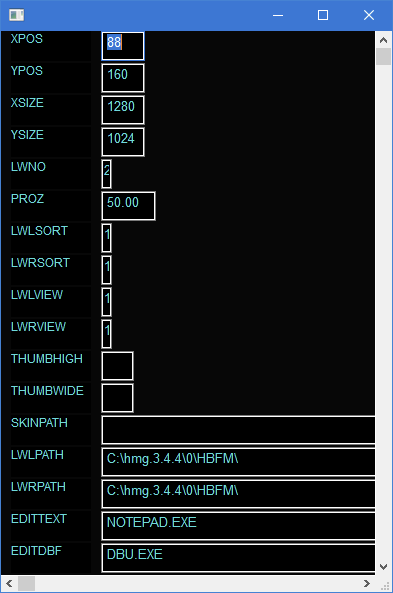
use a DBF as Parameter
press F1 to open EditForm
WHAT does not work ?
it is Part of this Project
use a DBF as Parameter
press F1 to open EditForm
have fun
Jimmy
Jimmy
-
serge_girard

- Posts: 3364
- Joined: Sun Nov 25, 2012 2:44 pm
- DBs Used: 1 MySQL - MariaDB
2 DBF - Location: Belgium
- Contact:
Re: WINDOW WITH scrollbars
It works indeed.
Jimmy, Why is scrolling with the wheel almost impossible? (In EDIT screen).
Serge
Jimmy, Why is scrolling with the wheel almost impossible? (In EDIT screen).
Serge
There's nothing you can do that can't be done...
-
AUGE_OHR
- Posts: 2108
- Joined: Sun Aug 25, 2019 3:12 pm
- DBs Used: DBF, PostgreSQL, MySQL, SQLite
- Location: Hamburg, Germany
Re: WINDOW WITH scrollbars
hi,
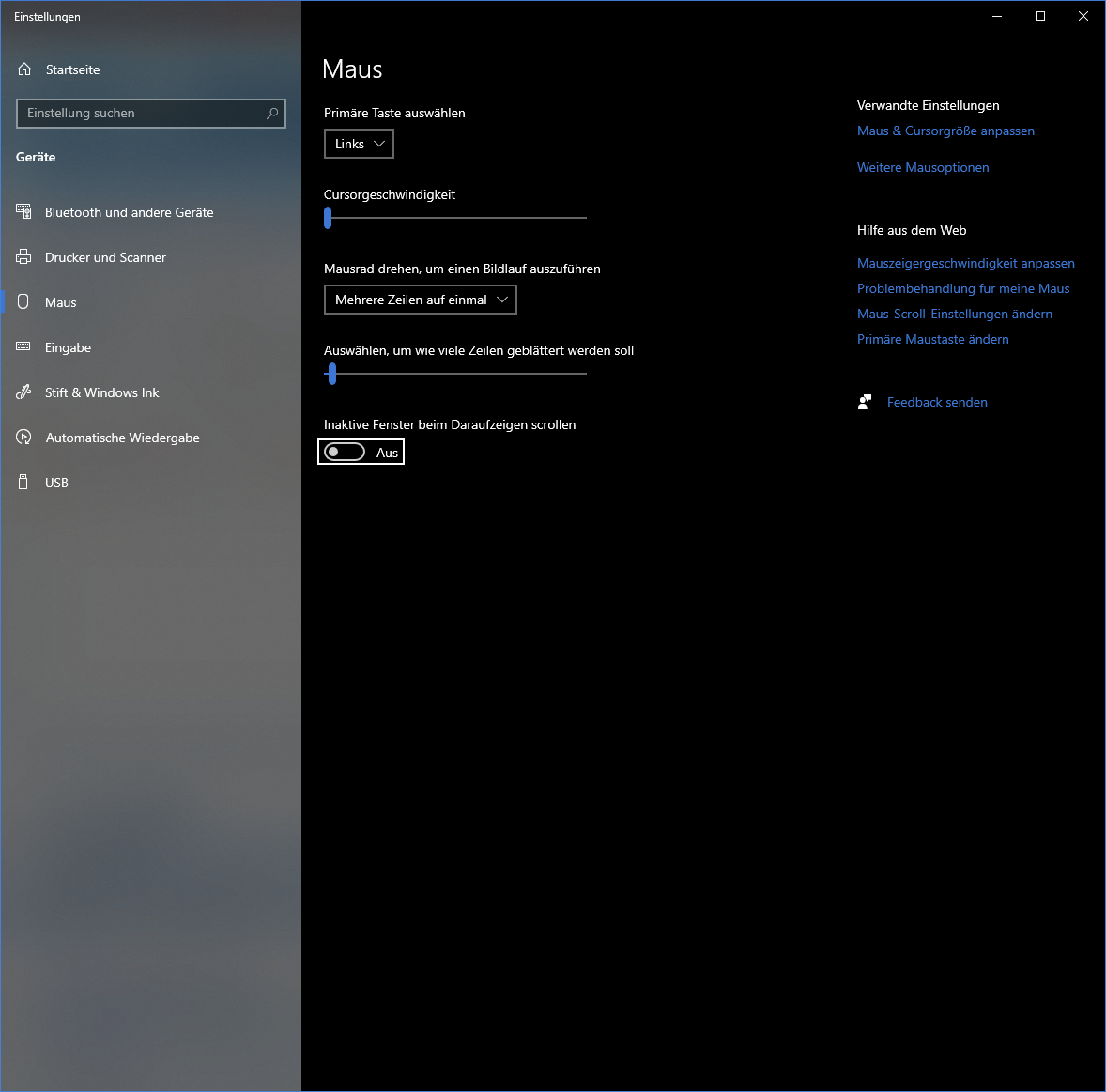
but you must disable "scroll when point to Window"
it work, you must 1st, click into Window !serge_girard wrote: ↑Tue Jan 27, 2026 9:09 am Why is scrolling with the wheel almost impossible? (In EDIT screen).
but you must disable "scroll when point to Window"
have fun
Jimmy
Jimmy
-
serge_girard
- Posts: 3364
- Joined: Sun Nov 25, 2012 2:44 pm
- DBs Used: 1 MySQL - MariaDB
2 DBF - Location: Belgium
- Contact:
Re: WINDOW WITH scrollbars
Reactions are very weird.... Cannot get it as I wish!
Sometimes it scrolls back and never gets over some point...
Sometimes it scrolls back and never gets over some point...
There's nothing you can do that can't be done...
-
AUGE_OHR
- Posts: 2108
- Joined: Sun Aug 25, 2019 3:12 pm
- DBs Used: DBF, PostgreSQL, MySQL, SQLite
- Location: Hamburg, Germany
Re: WINDOW WITH scrollbars
hi,
Have you tried changing the mouse sensitivity?
that i can´t help.
Have you tried changing the mouse sensitivity?
have fun
Jimmy
Jimmy
-
serge_girard
- Posts: 3364
- Joined: Sun Nov 25, 2012 2:44 pm
- DBs Used: 1 MySQL - MariaDB
2 DBF - Location: Belgium
- Contact:
Re: WINDOW WITH scrollbars
Yes I did. I already had some sort of window with scrollbars and the problems arise also.
I will try on another PC...
Thanks, Serge
I will try on another PC...
Thanks, Serge
There's nothing you can do that can't be done...