Perfecto Gregory, muchas gracias !!!.
Entonces con la Standard Syntax (xBase Style) le falla la propiedad SORT.
-------------------------------------------
Gregory Perfect, thank you very much !!!.
Then with the Standard Syntax (xBase Style) SORT property fails.
Re: HMG 3.3.1 (Stable)
Posted: Sun Oct 05, 2014 7:37 pm
by Javier Tovar
Gracias Gregory por tu apoyo!
Excelente
Saludos
HMG 3.3.1 (Stable)
Posted: Wed Oct 08, 2014 5:46 pm
by Pablo César
Rathinagiri wrote:
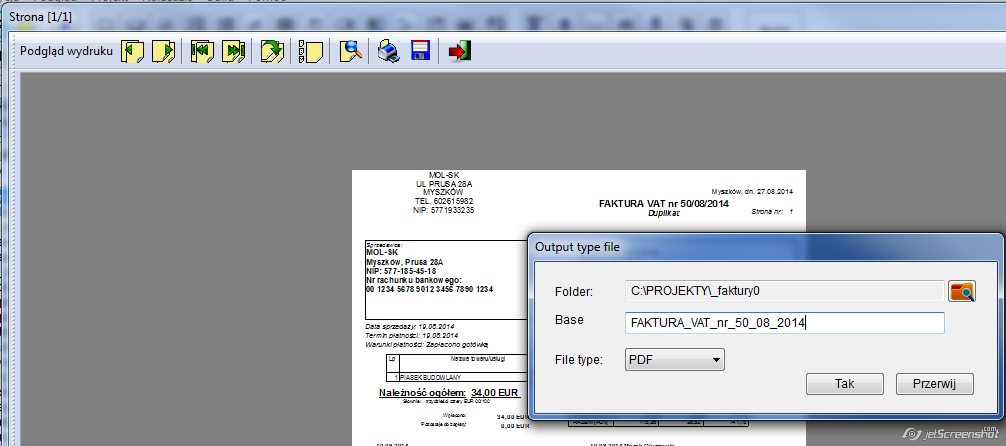
mol wrote:I've modified h_controlmisc.prg to allow user to enter base filename for saving his prinouts:
Function _HMG_PRINTER_SavePages()
Local c , i , f , t , d , e, x, h, a := {}
Local g := {"PDF", "BMP","JPG","GIF","TIF","PNG","EMF"}
Local nTypePicture := { Nil , BT_FILEFORMAT_BMP, BT_FILEFORMAT_JPG, BT_FILEFORMAT_GIF, BT_FILEFORMAT_TIF, BT_FILEFORMAT_PNG, Nil }
Local hBitmap, nType
Local flag_PDF := .F.
local nWidth, nHeight, nDPI, cDocName

x := _HMG_PRINTER_GetOutFileType ( g )   /*          Returns following Array:
                                               ( x[1]=>Folder_Name | x[2]=>File_Type | x[3]=>Base file name)  */

if HMG_LEN(x)=0
   Return Nil
endif

IF x[ 2 ] == 1
   flag_PDF := .T.
endif

cDocName := alltrim(x[ 3 ])
if empty(cDocName)
	cDocName := "HMG_PrintFile_"
else
	// avoid to use special chars in filename
	cDocName := charrepl(":/.,|\@#$%&^*+ ",_HMG_SYSDATA [ 358 ],"_") + "_"
endif

If HB_URIGHT(x[1],1) != '\'
   e := x[1] + '\'
Else
   e := x[1]
endif

h := g[x[2]] // File_Type extension

nType := nTypePicture[ x[2] ]

t := gettempfolder()
//MsgStop(_HMG_SYSDATA [ 358 ])

c := adir ( t + _HMG_SYSDATA [ 379 ] + "_hmg_print_preview_*.Emf")

asize ( a , c )

adir ( t + _HMG_SYSDATA [ 379 ]  + "_hmg_print_preview_*.Emf" , a )


For i := 1 To c
    f := t + a [i]
    d := e + cDocName + StrZero ( i , 4 )
	//MsgStop("f->"+f+chr(10)+"t->"+t+chr(10)+"d->"+d+chr(10)+"cDocName->"+ cDocName+ "len(a)->"+str(len(a)))
    IF HMG_UPPER (h) == "EMF"
       COPY FILE (F) TO (D+"."+h)
    ELSE


      // by Dr. Claudio Soto, April 2014
       hBitmap = BT_BitmapLoadEMF ( f, WHITE )

       IF hBitmap <> 0 .AND. flag_PDF == .F.
          BT_BitmapSaveFile (hBitmap, d+"."+h, nType)
          BT_BitmapRelease (hBitmap)
       ENDIF

       IF hBitmap <> 0 .AND. flag_PDF == .T.   // by Rathinagiri (May 2014)
         if i == 1
            nDPI    := 300
            nWidth  := ( BT_BitmapWidth ( hBitmap ) / nDPI * 25.4 )
            nHeight := ( BT_BitmapHeight( hBitmap ) / nDPI * 25.4 )
            _HMG_HPDF_INIT ( d+".pdf", 1, 256, nHeight, nWidth, .f. )
            _hmg_hpdf_startdoc()
            _HMG_HPDF_SetCompression( 'ALL' )
            h := "JPG"
         endif

         _hmg_hpdf_startpage()
         BT_BitmapSaveFile (hBitmap, d+"."+h, BT_FILEFORMAT_JPG)
         BT_BitmapRelease (hBitmap)
         _HMG_HPDF_IMAGE ( d+"."+h, 0, 0, nHeight, nWidth, .t. , h )
         _hmg_hpdf_endpage()
         FERASE( d+"."+h )

         if i == c
            _hmg_hpdf_enddoc()
         endif

       ENDIF

    ENDIF
Next i
Return Nil


Function _HMG_PRINTER_GetOutFileType (aFiletype)   // by Pablo César, April 2014
Local cFolder_aux,cFolder:=GetCurrentFolder(), aRet:={}

DEFINE WINDOW Out_File AT 171 , 285 WIDTH 468 HEIGHT 179 ;
    TITLE "Output type file" MODAL NOSIZE NOSYSMENU

    ON KEY ESCAPE ACTION ThisWindow.Release()

    DEFINE LABEL Label_1
        ROW    22
        COL    20
        WIDTH  60
        HEIGHT 20
        VALUE "Folder:"
        FONTNAME "Arial"
        FONTSIZE 9
    END LABEL

    DEFINE TEXTBOX Text_1
        ROW    18
        COL    90
        WIDTH  320
        HEIGHT 22
        FONTNAME "Arial"
        FONTSIZE 9
        TOOLTIP ""
        READONLY .T.
        VALUE cFolder
    END TEXTBOX

    DEFINE BUTTON Button_1
        ROW    17
        COL    412
        WIDTH  30
        HEIGHT 24
        ACTION (cFolder_aux:=GetFolder(),cFolder := IIF (EMPTY(cFolder_aux),cFolder,cFolder_aux), SetProperty("Out_File","Text_1","Value",cFolder))
        FONTNAME "Arial"
        FONTSIZE 9
        PICTURE "HP_FOLDER"
        PICTALIGNMENT TOP
    END BUTTON

	DEFINE LABEL Label_OutFileName
        ROW    50
        COL    10
        WIDTH  79
        HEIGHT 40
        VALUE "Base filename:"
        FONTNAME "Arial"
        FONTSIZE 9
    END LABEL

    DEFINE TEXTBOX Text_OutFileName
        ROW    50
        COL    90
        WIDTH  320
        HEIGHT 22
        FONTNAME "Arial"
        FONTSIZE 9
        TOOLTIP ""
        READONLY .F.
        VALUE charrepl(":/.,|\@#$%&^*+ ",_HMG_SYSDATA [ 358 ],"_")
    END TEXTBOX

    DEFINE LABEL Label_2
        ROW    90
        COL    20
        WIDTH  60
        HEIGHT 20
        VALUE "File type:"
        FONTNAME "Arial"
        FONTSIZE 9
    END LABEL

    DEFINE COMBOBOX Combo_1
        ROW      86
        COL      90
        WIDTH    100
        HEIGHT   126
        ITEMS    aFiletype
        VALUE    1
        FONTNAME "Arial"
        FONTSIZE 9
    END COMBOBOX

    DEFINE BUTTON Button_2
        ROW    110
        COL    270
        WIDTH  80
        HEIGHT 24
        ACTION (aRet:={GetProperty("Out_File","Text_1","Value"),GetProperty("Out_File","Combo_1","Value"),GetProperty("Out_File","Text_OutFileName","Value")},ThisWindow.Release())
        CAPTION _HMG_SYSDATA [ 371 ] [11]
        FONTNAME "Arial"
        FONTSIZE 9
    END BUTTON

    DEFINE BUTTON Button_3
        ROW    110
        COL    360
        WIDTH  80
        HEIGHT 24
        ACTION ThisWindow.Release()
        CAPTION _HMG_SYSDATA [ 371 ] [12]
        FONTNAME "Arial"
        FONTSIZE 9
    END BUTTON

END WINDOW
CENTER WINDOW Out_File
ACTIVATE WINDOW Out_File
Return aRet
Thank you Marek. Will use it.
Hi Rathi and Claudio, I would like to make additional requests in this matter.
1. The enlarged option "Save as" in preview brought an inconvenient for those clients/companies do not wish to able users for saving reports. I suggest to let programmer let setted if this option could be used or not for any user. IMHO we could arrange to disable save button at preview, as Daniel Maximiliano indicated. See picture below:
Screen.PNG (17.37 KiB) Viewed 4384 times
With previously setting trhu a CONSTANT (for example) we probably can let it disabled this option of "save as" by the button. Here in this topic the user demand.
2. With PREVIEW option, _HMG_PRINTER_STARTPAGE_PREVIEW creates metafiles in tempory folder using TempFolder() function. I would like this option also be settable path previously by the programmer. By this, we would have all the metafiles already created in the settable path without to be saved again and in duplicity. But also will need to let it optional for deleting metafiles when is _HMG_PRINTER_ENDPAGE_PREVIEW is actioned.
3. Our friend Marek presented a solution for mask name (wildcard, template names) to use for "Save as" option in preview. I would like to make it this mask names previously, probably by setting mask priviously thru a CONSTANT before executing the preview.
Briefly:
Shall it be created 3 CONSTANTs to attend these 3 optional cases. When not used, will be acted as always came up working. Not changing. That is, while maintaining backward compatibility.
SAVE_AS := .T. or .F. (default is .T., when variable is Nil) MASK_FILE := <Template name> (default is "HMG_MiniPrint_", when variable is Nil) EMF_PATH := <Full path> (default is obtained by GetTempFolder()+ _HMG_SYSDATA [ 379 ], when variable is Nil)
What do you think about these indications ? Can it be implemented at HMG lib ? Do you need to I present my source codes ?
Re: HMG 3.3.1 (Stable)
Posted: Wed Oct 08, 2014 7:15 pm
by mol
Nice idea, Pablo!
Re: HMG 3.3.1 (Stable)
Posted: Wed Oct 08, 2014 9:47 pm
by Javier Tovar
Excelente Idea Pablo César!
Saludos
HMG 3.3.1 (Stable)
Posted: Wed Oct 08, 2014 10:49 pm
by Pablo César
Thank you Marek and Javier for your comments.
I have intentions to use HMG_PRINT (graphical mode) in console app and I believe to generate EMF files (not making preview, not by _HMG_PRINTER_SHOWPREVIEW) and keeps metafiles saved in app folder. Because thru EMF I can still print it and in the future I can use _HMG_PRINTER_SHOWPREVIEW with few changings.
I still have some clients with console mode one app that I can not migrate yet and to take control of metafiles will be also great !
Rare Behaviour
Posted: Fri Oct 17, 2014 1:17 pm
by EduardoLuis
Hi Friends
I've experimente an extrange behaviour of columcontrol in grid.-
On both types of definitios (normal or defined), don't exhibit numbers with punctuation.-
I attach a *.prg to show you the problem.-
Perhaps i've made a mistake, but i don't think so.-
Tables are created automatically.-
If someone could show me the error, will be apreciated.-
With regards.
Eduardo
Re: HMG 3.3.1 (Stable)
Posted: Fri Oct 17, 2014 3:59 pm
by Javier Tovar
Hola Eduardo Luis,
Recuerda que la propiedad "COLUMNCONTROLS { aCtrl_1 , aCtrl_2 , aCtrl_3 } ;", esta nos ayuda al editar el GRID...
Y "DYNAMICDISPLAY" nos sirve para visualizar la forma en que se muestran los datos en la GRID.,
Gracias por tu ayuda.-
De todos modos, fijate en el sample GRID_20, donde no hay DYNAMICDISPLAY, y en pantalla visualizas correctamente la definición del COLUMNCONTROL.-
De hecho, para respetar la puntuación decimal que utilizamos en argentina, le adicioné ' , "E"', y se visualiza correctamente.-
Entiendo que no debería haber diferencias de funcionamiento esté el GRID cargado con datos de una tabla, que - como en el ejemplo del GRID_20 - con datos provenientes de una matriz.-
Solo por curiosidad, intenta el ejemplo del GRID_20 - que funciona correctamente con un array - pero cargándolo con una tabla (que tenga idéntico contenido).- Verás que al estar cargado el GRID con el contenido de la tabla, desconoce el COLUMNCONTROL.-
De todos modos tu aporte me ayuda a resolver el problema, aunque signifique un proceso algo mas complejo para el manejo de los decimales.-
Desde ya te quedo muy agradecido por tu colaboración.-
Cordialmente.
Eduardo